The Platform's Data space Concept
The data spaceData spaceA thematic area that contains specific data and resources in different platform components. Data is stored in exactly one data space, and access rights are specific to each data space. Roles within a data space control what users and groups can do in it. concept on the CIVITAS/CORE platform provides a fine-grained approach for managing user access across various platform components (e.g., FROST-ServerFROST-ServerA server implementation of the OGC SensorThings API for sensor data. On the platform, a data space maps to a project in FROST-Server, and users get access through project-specific roles., SupersetSupersetApache Superset, the component for data visualizations and dashboards. Roles and permissions per data space control access to its data sources and dashboards., StellioStellioAn NGSI-LD compatible context broker. On the platform, a data space maps to a tenant in Stellio with separate roles for reading, writing, and deleting entities., GeoServerGeoServerThe component for geo-spatial content on the platform. Access to its layers and layer groups is controlled by roles that are specific to each data space.). Data spacesData spaceA thematic area that contains specific data and resources in different platform components. Data is stored in exactly one data space, and access rights are specific to each data space. Roles within a data space control what users and groups can do in it. are thematic areas that contain specific data and resources in different components.
Access rights on the platform are data spaceData spaceA thematic area that contains specific data and resources in different platform components. Data is stored in exactly one data space, and access rights are specific to each data space. Roles within a data space control what users and groups can do in it.-specific. Based on the concepts of users, groups, roles, and permissions, users are assigned access rights specific to each data spaceData spaceA thematic area that contains specific data and resources in different platform components. Data is stored in exactly one data space, and access rights are specific to each data space. Roles within a data space control what users and groups can do in it..
Data spacesData spaceA thematic area that contains specific data and resources in different platform components. Data is stored in exactly one data space, and access rights are specific to each data space. Roles within a data space control what users and groups can do in it. can be visualized as silos. Data is stored in exactly one data spaceData spaceA thematic area that contains specific data and resources in different platform components. Data is stored in exactly one data space, and access rights are specific to each data space. Roles within a data space control what users and groups can do in it. , and users are assigned access to the data spaceData spaceA thematic area that contains specific data and resources in different platform components. Data is stored in exactly one data space, and access rights are specific to each data space. Roles within a data space control what users and groups can do in it. via data spaceData spaceA thematic area that contains specific data and resources in different platform components. Data is stored in exactly one data space, and access rights are specific to each data space. Roles within a data space control what users and groups can do in it.-specific roles on different platform components (e.g., dashboards in SupersetSupersetApache Superset, the component for data visualizations and dashboards. Roles and permissions per data space control access to its data sources and dashboards., APIs in the FROST-ServerFROST-ServerA server implementation of the OGC SensorThings API for sensor data. On the platform, a data space maps to a project in FROST-Server, and users get access through project-specific roles.).
Main Entities
In the following, we describe the main entities of the CIVITAS/CORE platform.
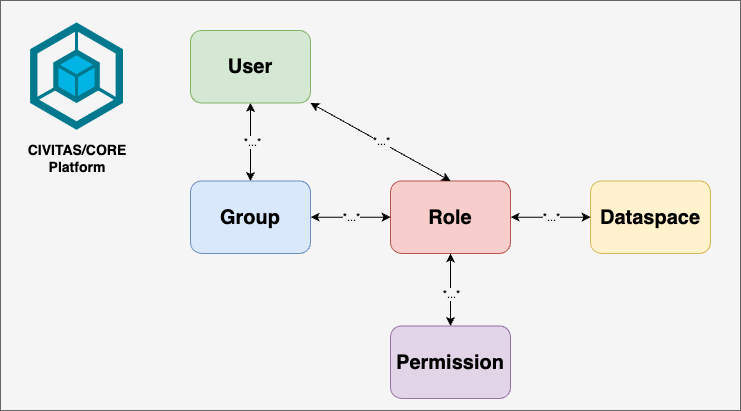
- User: Any individual or entity that accesses the platform.
- A user belongs to one or multiple groups.
- A user can have one or multiple roles.
- Group: A collection of users that inherit roles assigned to that group.
- A group can have one or multiple users.
- Role: A set of permissions granted to either a user or group. These roles are specific to each data spaceData spaceA thematic area that contains specific data and resources in different platform components. Data is stored in exactly one data space, and access rights are specific to each data space. Roles within a data space control what users and groups can do in it. and define what actions the user or group can perform.
- A role can be assigned to one or multiple users.
- A role can be assigned to one or multiple groups.
- A role can have one or multiple permissions.
- Permission: Defines the authorization to perform a specific action, such as reading, writing, or administrating resources within a data spaceData spaceA thematic area that contains specific data and resources in different platform components. Data is stored in exactly one data space, and access rights are specific to each data space. Roles within a data space control what users and groups can do in it.. Permissions are assigned within roles.
- A permission can be assigned to one or multiple roles.
- Data spaceData spaceA thematic area that contains specific data and resources in different platform components. Data is stored in exactly one data space, and access rights are specific to each data space. Roles within a data space control what users and groups can do in it.: A thematic area containing specific data and resources. Roles within a data spaceData spaceA thematic area that contains specific data and resources in different platform components. Data is stored in exactly one data space, and access rights are specific to each data space. Roles within a data space control what users and groups can do in it. control what users and groups can do within that data spaceData spaceA thematic area that contains specific data and resources in different platform components. Data is stored in exactly one data space, and access rights are specific to each data space. Roles within a data space control what users and groups can do in it..
- A data spaceData spaceA thematic area that contains specific data and resources in different platform components. Data is stored in exactly one data space, and access rights are specific to each data space. Roles within a data space control what users and groups can do in it. can have one or multiple roles.
The entities are visualized in the following image. We use this color code to illustrate the mapping of the platform entities to the entities of individual platform components in the following:
- User: green
- Group: blue
- Role: red
- Permission: purple
- Data_space: yellow
Example Data space for Soil Moisture Analysis
A use case for the CIVITAS/CORE platform could be the sustainable irrigation of urban trees using sensor-based demand assessment. For this use case, there may be a data spaceData spaceA thematic area that contains specific data and resources in different platform components. Data is stored in exactly one data space, and access rights are specific to each data space. Roles within a data space control what users and groups can do in it. called 'Soil Moisture'.
The 'Soil Moisture' data spaceData spaceA thematic area that contains specific data and resources in different platform components. Data is stored in exactly one data space, and access rights are specific to each data space. Roles within a data space control what users and groups can do in it. contains all the data and resources related to soil moisture analysis. It requires specific roles that control what users and groups can do with the data across various components of the platform (e.g., dashboards in SupersetSupersetApache Superset, the component for data visualizations and dashboards. Roles and permissions per data space control access to its data sources and dashboards.). The roles within this data spaceData spaceA thematic area that contains specific data and resources in different platform components. Data is stored in exactly one data space, and access rights are specific to each data space. Roles within a data space control what users and groups can do in it. define access rights, for example, to view or edit the soil moisture data.
The 'Soil Moisture' group represents a collection of users with access rights to data and resources related to soil moisture analysis. This group will have assigned roles that grant specific permissions. Hence, a user can have specific roles in the data spaceData spaceA thematic area that contains specific data and resources in different platform components. Data is stored in exactly one data space, and access rights are specific to each data space. Roles within a data space control what users and groups can do in it..
For example, there may be a role called "Soil_Moisture_Editor." This role grants permissions to edit and update data related to soil moisture analysis and includes the necessary permissions. The "Soil_Moisture_Viewer" role in this data spaceData spaceA thematic area that contains specific data and resources in different platform components. Data is stored in exactly one data space, and access rights are specific to each data space. Roles within a data space control what users and groups can do in it. grants read-only access to the data related to soil moisture analysis.
Let’s take Alice and Bob as examples:
- Alice is a data analyst and works with soil moisture data. For example, she creates charts and dashboards in SupersetSupersetApache Superset, the component for data visualizations and dashboards. Roles and permissions per data space control access to its data sources and dashboards. to visualize the data. She is assigned the "Editor" role, which allows her to edit, delete, and add new records for her analysis.
- Bob also works on the sustainable irrigation of urban trees. He is a project manager and wants to check information, for example, about the sensors used. Therefore, he only needs to view the records and search through the data, but he does not need to modify or delete any information. Hence, he is assigned the "Viewer" role.
Alice's, and Bob's roles hold through each platform component.
Managing data space-specific access rights with Keycloak
KeycloakKeycloakThe component that manages access to data spaces across all platform components. It uses realms, clients, roles, users, and groups, and represents each data space through specific roles. manages access to data spacesData spaceA thematic area that contains specific data and resources in different platform components. Data is stored in exactly one data space, and access rights are specific to each data space. Roles within a data space control what users and groups can do in it. through all platform components using RealmsRealmThe top-level container in Keycloak that holds all users, roles, groups, and permissions of the platform. Realms are independent of each other. All data spaces of a platform are contained in a single realm., Clients, Roles, Users, and Groups. Each data spaceData spaceA thematic area that contains specific data and resources in different platform components. Data is stored in exactly one data space, and access rights are specific to each data space. Roles within a data space control what users and groups can do in it. is represented by specific roles in KeycloakKeycloakThe component that manages access to data spaces across all platform components. It uses realms, clients, roles, users, and groups, and represents each data space through specific roles., and access is managed through role assignments to users or groups.
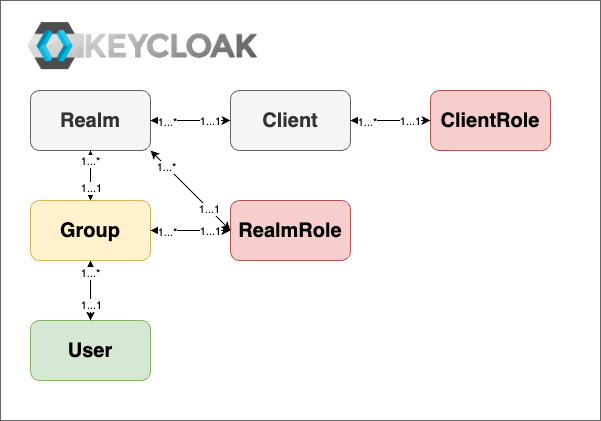
Keycloak Entities
- RealmRealmThe top-level container in Keycloak that holds all users, roles, groups, and permissions of the platform. Realms are independent of each other. All data spaces of a platform are contained in a single realm.: A "top-level container" that holds all users, roles, groups, and permissions for the platform. Each realmRealmThe top-level container in Keycloak that holds all users, roles, groups, and permissions of the platform. Realms are independent of each other. All data spaces of a platform are contained in a single realm. is independent (currently one platform is supported). All data spacesData spaceA thematic area that contains specific data and resources in different platform components. Data is stored in exactly one data space, and access rights are specific to each data space. Roles within a data space control what users and groups can do in it. are contained in a single realmRealmThe top-level container in Keycloak that holds all users, roles, groups, and permissions of the platform. Realms are independent of each other. All data spaces of a platform are contained in a single realm..
- Client: Represents any platform component, e.g. FROST-ServerFROST-ServerA server implementation of the OGC SensorThings API for sensor data. On the platform, a data space maps to a project in FROST-Server, and users get access through project-specific roles., that interacts with KeycloakKeycloakThe component that manages access to data spaces across all platform components. It uses realms, clients, roles, users, and groups, and represents each data space through specific roles. to authenticate users and collects their roles (see role mappingRole MappingIn Keycloak, the assignment of roles to users or groups. It lets data-space-specific roles control access. below) and passes them to the corresponding platform components.
- Realm RoleRealm RoleA Keycloak role that applies across all clients within a realm and is not specific to one client.: A role that applies across all clients within a realmRealmThe top-level container in Keycloak that holds all users, roles, groups, and permissions of the platform. Realms are independent of each other. All data spaces of a platform are contained in a single realm., not specific to individual clients.
- Client RoleClient RoleA Keycloak role that belongs to one client and controls access to resources within that client.: A client-specific role applied to control access to resources within a specific client.
- Composite RoleComposite RoleA Keycloak role that aggregates other roles, both realm roles and client roles. It allows complex role hierarchies.: A role aggregating other roles (both realm rolesRealm RoleA Keycloak role that applies across all clients within a realm and is not specific to one client. and client rolesClient RoleA Keycloak role that belongs to one client and controls access to resources within that client.), allowing complex hierarchies.
- User: An entity authenticated and authorized to access platform resources. Users are assigned roles, directly or through group memberships.
- Group: A collection of users. Assigning roles to a group grants all users within that group the assigned roles for the corresponding data spaceData spaceA thematic area that contains specific data and resources in different platform components. Data is stored in exactly one data space, and access rights are specific to each data space. Roles within a data space control what users and groups can do in it..
- Role MappingRole MappingIn Keycloak, the assignment of roles to users or groups. It lets data-space-specific roles control access.: Assigning roles to users or groups, allowing data spaceData spaceA thematic area that contains specific data and resources in different platform components. Data is stored in exactly one data space, and access rights are specific to each data space. Roles within a data space control what users and groups can do in it.-specific roles to control access.
Data spaces in different platform components
In the following chapters, we explore how the platform's data spaceData spaceA thematic area that contains specific data and resources in different platform components. Data is stored in exactly one data space, and access rights are specific to each data space. Roles within a data space control what users and groups can do in it. concept is implemented across different platform components.
Each component of the platform, e.g., FROST-ServerFROST-ServerA server implementation of the OGC SensorThings API for sensor data. On the platform, a data space maps to a project in FROST-Server, and users get access through project-specific roles. or SupersetSupersetApache Superset, the component for data visualizations and dashboards. Roles and permissions per data space control access to its data sources and dashboards., implements its own interpretation of the data spaceData spaceA thematic area that contains specific data and resources in different platform components. Data is stored in exactly one data space, and access rights are specific to each data space. Roles within a data space control what users and groups can do in it. model, aligning with the core functionality of the component.
With KeycloakKeycloakThe component that manages access to data spaces across all platform components. It uses realms, clients, roles, users, and groups, and represents each data space through specific roles. being used for identity management across all platform components, data spaceData spaceA thematic area that contains specific data and resources in different platform components. Data is stored in exactly one data space, and access rights are specific to each data space. Roles within a data space control what users and groups can do in it.-specific roles are configured there and then mapped to the functionality and entities of the individual platform components.
Depending on the interpretation of the data spaceData spaceA thematic area that contains specific data and resources in different platform components. Data is stored in exactly one data space, and access rights are specific to each data space. Roles within a data space control what users and groups can do in it. concept in the different platform components, the entity configuration in KeycloakKeycloakThe component that manages access to data spaces across all platform components. It uses realms, clients, roles, users, and groups, and represents each data space through specific roles. slightly differs. Additionally, some components require the administration of permissions in the component itself, while others can work directly with the roles defined in KeycloakKeycloakThe component that manages access to data spaces across all platform components. It uses realms, clients, roles, users, and groups, and represents each data space through specific roles..
To illustrate this for each component, we explain in the following chapters:
- The data spaceData spaceA thematic area that contains specific data and resources in different platform components. Data is stored in exactly one data space, and access rights are specific to each data space. Roles within a data space control what users and groups can do in it. configuration: How the key entities of the platform are organized into data spacesData spaceA thematic area that contains specific data and resources in different platform components. Data is stored in exactly one data space, and access rights are specific to each data space. Roles within a data space control what users and groups can do in it. in KeycloakKeycloakThe component that manages access to data spaces across all platform components. It uses realms, clients, roles, users, and groups, and represents each data space through specific roles.
- The role management and assignment: How roles are assigned to users through KeycloakKeycloakThe component that manages access to data spaces across all platform components. It uses realms, clients, roles, users, and groups, and represents each data space through specific roles. and how these roles map to specific permissions in the component
- The permission enforcement: How the component enforces access controls based on the roles defined in KeycloakKeycloakThe component that manages access to data spaces across all platform components. It uses realms, clients, roles, users, and groups, and represents each data space through specific roles.