Data spaces in GeoServer
To configure the data spaceData spaceA thematic area that contains specific data and resources in different platform components. Data is stored in exactly one data space, and access rights are specific to each data space. Roles within a data space control what users and groups can do in it. model of the platform in GeoServerGeoServerThe component for geo-spatial content on the platform. Access to its layers and layer groups is controlled by roles that are specific to each data space., users are assigned to data spaceData spaceA thematic area that contains specific data and resources in different platform components. Data is stored in exactly one data space, and access rights are specific to each data space. Roles within a data space control what users and groups can do in it.-specific roles in KeycloakKeycloakThe component that manages access to data spaces across all platform components. It uses realms, clients, roles, users, and groups, and represents each data space through specific roles.. This ensures that data access and manipulation are tightly controlled through role-based permissions, allowing users to interact only with the geo-spatial content relevant to data spacesData spaceA thematic area that contains specific data and resources in different platform components. Data is stored in exactly one data space, and access rights are specific to each data space. Roles within a data space control what users and groups can do in it. they have access to. The GeoServerGeoServerThe component for geo-spatial content on the platform. Access to its layers and layer groups is controlled by roles that are specific to each data space. manages access to geo-spatial content using Roles, Users, Permissions, and Groups.
How the Platform's Data space Concept Maps to GeoServer
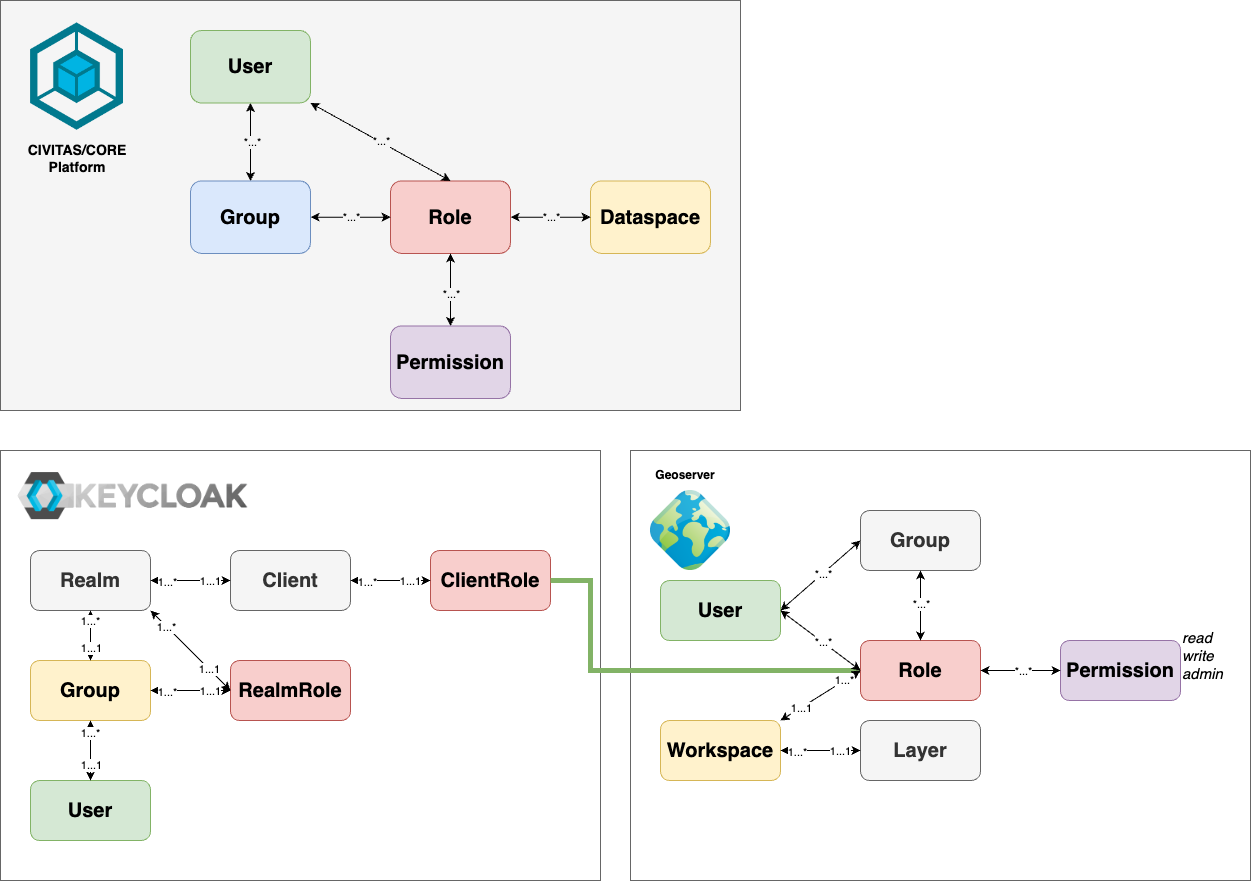
For each data spaceData spaceA thematic area that contains specific data and resources in different platform components. Data is stored in exactly one data space, and access rights are specific to each data space. Roles within a data space control what users and groups can do in it., we implement our own set of roles which get permissions on geo-spatial data (Layers, Layer-groupsLayer-groupIn GeoServer, a special layer type that is managed in the same way as a layer from a security perspective.) granted by assigning the corresponding permissions to the role in GeoServerGeoServerThe component for geo-spatial content on the platform. Access to its layers and layer groups is controlled by roles that are specific to each data space..
- Layers: Layers are the finest level where permissions to roles in the GeoServerGeoServerThe component for geo-spatial content on the platform. Access to its layers and layer groups is controlled by roles that are specific to each data space. can be granted. On this level, you can specify Read, Write or Administrative Access individually to each layer. Additionally, Layers are assigned to workspaces in GeoServerGeoServerThe component for geo-spatial content on the platform. Access to its layers and layer groups is controlled by roles that are specific to each data space. and inherit the permissions from there, if no individual configuration is done on layer level.
- Layer-groupsLayer-groupIn GeoServer, a special layer type that is managed in the same way as a layer from a security perspective.: Layer-groupsLayer-groupIn GeoServer, a special layer type that is managed in the same way as a layer from a security perspective. are from the security perspective special layer types. Layer-groupsLayer-groupIn GeoServer, a special layer type that is managed in the same way as a layer from a security perspective. are managed in the same way as layers.
- Permission: Permissions in GeoServerGeoServerThe component for geo-spatial content on the platform. Access to its layers and layer groups is controlled by roles that are specific to each data space. (standard, without plugins) can be assigned in three levels: read, write and admin. Read and Write grant only access to existing Layers (using them). Admin permissions grant the right to manage a layer.
- Groups GeoServerGeoServerThe component for geo-spatial content on the platform. Access to its layers and layer groups is controlled by roles that are specific to each data space. allows working with groups within the platform. These are not used for the CIVITAS/CORE Platform.
- Workspaces Workspaces in GeoServerGeoServerThe component for geo-spatial content on the platform. Access to its layers and layer groups is controlled by roles that are specific to each data space. are a hierarchical structure above many GeoServerGeoServerThe component for geo-spatial content on the platform. Access to its layers and layer groups is controlled by roles that are specific to each data space. entities like Layers and Layer-groupsLayer-groupIn GeoServer, a special layer type that is managed in the same way as a layer from a security perspective.. They are only used to structure the content. In CIVITAS/CORE we use them to group all Entities of one data spaceData spaceA thematic area that contains specific data and resources in different platform components. Data is stored in exactly one data space, and access rights are specific to each data space. Roles within a data space control what users and groups can do in it.. This grouping enables permissions and role assignments to be set at the workspace level, with inheritance to assigned entities.
Example for Keycloak and GeoServer
The following settings describe the data spacesData spaceA thematic area that contains specific data and resources in different platform components. Data is stored in exactly one data space, and access rights are specific to each data space. Roles within a data space control what users and groups can do in it. named "baumkataster" and "denkmalschutz" defined in KeycloakKeycloakThe component that manages access to data spaces across all platform components. It uses realms, clients, roles, users, and groups, and represents each data space through specific roles. and GeoServerGeoServerThe component for geo-spatial content on the platform. Access to its layers and layer groups is controlled by roles that are specific to each data space.:
- KeycloakKeycloakThe component that manages access to data spaces across all platform components. It uses realms, clients, roles, users, and groups, and represents each data space through specific roles. client "geostack":
- Roles for data spaceData spaceA thematic area that contains specific data and resources in different platform components. Data is stored in exactly one data space, and access rights are specific to each data space. Roles within a data space control what users and groups can do in it. "baumkataster":
baumkataster - Roles for data spaceData spaceA thematic area that contains specific data and resources in different platform components. Data is stored in exactly one data space, and access rights are specific to each data space. Roles within a data space control what users and groups can do in it. "denkmalschutz":
denkmalschutz
- Roles for data spaceData spaceA thematic area that contains specific data and resources in different platform components. Data is stored in exactly one data space, and access rights are specific to each data space. Roles within a data space control what users and groups can do in it. "baumkataster":
- KeycloakKeycloakThe component that manages access to data spaces across all platform components. It uses realms, clients, roles, users, and groups, and represents each data space through specific roles. user "Max Mustermann" (
max@mustermann.de)- direct user-role assignment:
baumkataster,denkmalschutz - or a group membership granting the
baumkatasteranddenkmalschutzroles respectively
- direct user-role assignment:
- GeoServerGeoServerThe component for geo-spatial content on the platform. Access to its layers and layer groups is controlled by roles that are specific to each data space. workspaces:
baumkataster,denkmalschutz - GeoServerGeoServerThe component for geo-spatial content on the platform. Access to its layers and layer groups is controlled by roles that are specific to each data space. Data Security Rules for each workspace
baumkataster,denkmalschutz:- Role
baumkatasteris in Selected Roles in the Data Security Rule for Workspacebaumkataster(unclick "Grant access to any roles") - Role
denkmalschutzis in Selected Roles in the Data Security Rule for Workspacedenkmalschutz(unclick "Grant access to any roles")
- Role
If Max requests a resource from GeoServerGeoServerThe component for geo-spatial content on the platform. Access to its layers and layer groups is controlled by roles that are specific to each data space. and therefore logs into GeoServerGeoServerThe component for geo-spatial content on the platform. Access to its layers and layer groups is controlled by roles that are specific to each data space. (via the KeycloakKeycloakThe component that manages access to data spaces across all platform components. It uses realms, clients, roles, users, and groups, and represents each data space through specific roles.),
- KeycloakKeycloakThe component that manages access to data spaces across all platform components. It uses realms, clients, roles, users, and groups, and represents each data space through specific roles. sends an access_token: (user:
max@mustermann.de, roles: [baumkataster,denkmalschutz]) - GeoServerGeoServerThe component for geo-spatial content on the platform. Access to its layers and layer groups is controlled by roles that are specific to each data space. creates a User:
max@mustermann.de(if not already existing) - GeoServerGeoServerThe component for geo-spatial content on the platform. Access to its layers and layer groups is controlled by roles that are specific to each data space. creates the roles: (
baumkataster,denkmalschutz) - Manually in GeoServerGeoServerThe component for geo-spatial content on the platform. Access to its layers and layer groups is controlled by roles that are specific to each data space., the permissions Read, Write and Admin are assigned to the roles
Mapping illustrated
The mapping is illustrated in the following image, using matching colors for corresponding objects.
Setting Up Data spaces in GeoServer
After completing the initial platform setup (refer to the Admin Guide), GeoServerGeoServerThe component for geo-spatial content on the platform. Access to its layers and layer groups is controlled by roles that are specific to each data space. is automatically configured to synchronize roles from KeycloakKeycloakThe component that manages access to data spaces across all platform components. It uses realms, clients, roles, users, and groups, and represents each data space through specific roles., ensuring it recognizes all existing platform roles (for each data spaceData spaceA thematic area that contains specific data and resources in different platform components. Data is stored in exactly one data space, and access rights are specific to each data space. Roles within a data space control what users and groups can do in it.).
During each user login, their assigned roles are also synced with GeoServerGeoServerThe component for geo-spatial content on the platform. Access to its layers and layer groups is controlled by roles that are specific to each data space.. The only remaining manual step is to assign the appropriate permissions to these synced roles at the workspace level. Once this is done, permissions are validated each time a user requests access to any content.
For further details on GeoServerGeoServerThe component for geo-spatial content on the platform. Access to its layers and layer groups is controlled by roles that are specific to each data space. administration, please consult the Admin Guide.