Build Pipelines in the Pipeline Editor
Role: Data Steward
Goal: You want to define how data is ingested, transformed, and stored within a DatasetDatasetA data-related element that contains processed data and makes it available for consumption. A Dataset is populated via Pipelines and carries Metadata and access permissions..
Required Permissions: update DatasetDatasetA data-related element that contains processed data and makes it available for consumption. A Dataset is populated via Pipelines and carries Metadata and access permissions.
What you will learn
After completing this guide, you will understand how to:
- use the Pipeline canvas
- create and manage multiple Pipelines within a DatasetDatasetA data-related element that contains processed data and makes it available for consumption. A Dataset is populated via Pipelines and carries Metadata and access permissions.
- add, configure, and connect nodes
- use Data sourcesData sourceA data-related element that represents the origin of data. It defines how data is connected, accessed, and ingested into the Platform, such as an external database or sensor network. and Data structure versions
- transform data using Mappings
- schedule Pipeline execution
- validate a Pipeline
Before you start
A Pipeline defines how data flows through the Platform for a specific use case. It can ingest data from a Data sourceData sourceA data-related element that represents the origin of data. It defines how data is connected, accessed, and ingested into the Platform, such as an external database or sensor network., transform it, and persist it in a Data storage.
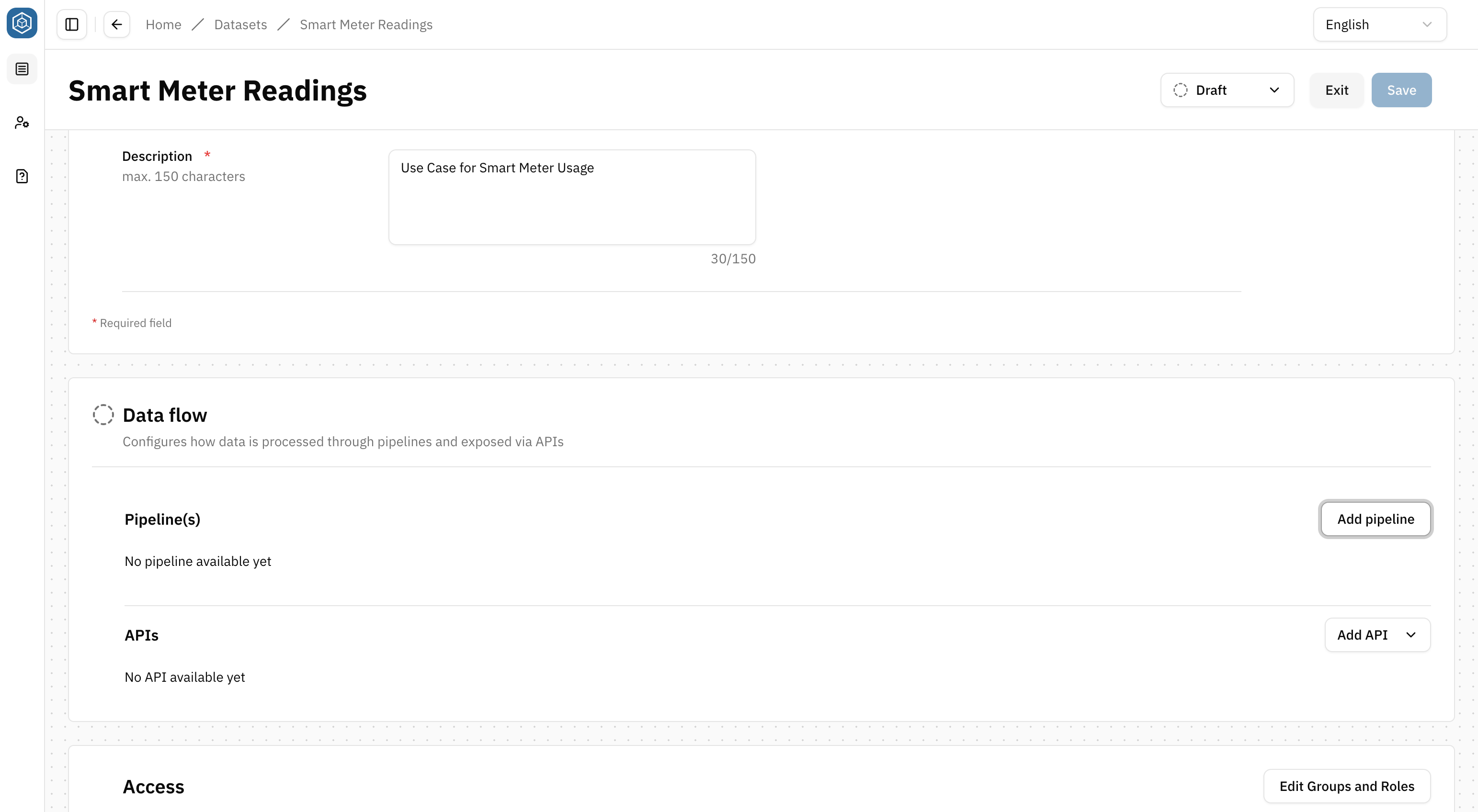
Pipelines belong to a DatasetDatasetA data-related element that contains processed data and makes it available for consumption. A Dataset is populated via Pipelines and carries Metadata and access permissions. and are configured in its Dataflow section.
To create a Pipeline:
- Open a DatasetDatasetA data-related element that contains processed data and makes it available for consumption. A Dataset is populated via Pipelines and carries Metadata and access permissions. in Draft status
- Go to the Dataflow section
- Select Add Pipeline
The Pipeline Editor opens.
Work with the Pipeline canvas
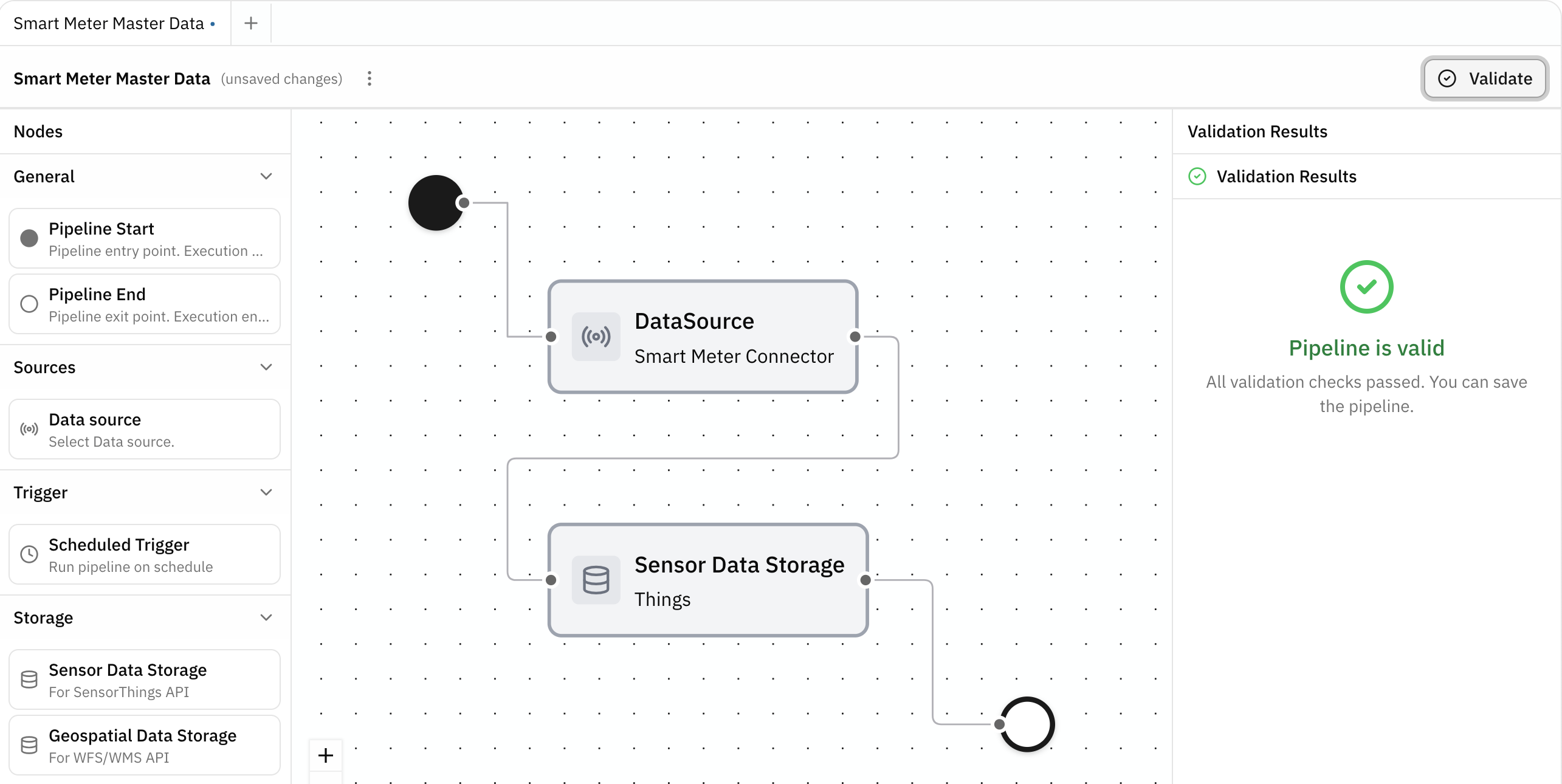
The Pipeline Editor provides a canvas-based interface for building data flows.
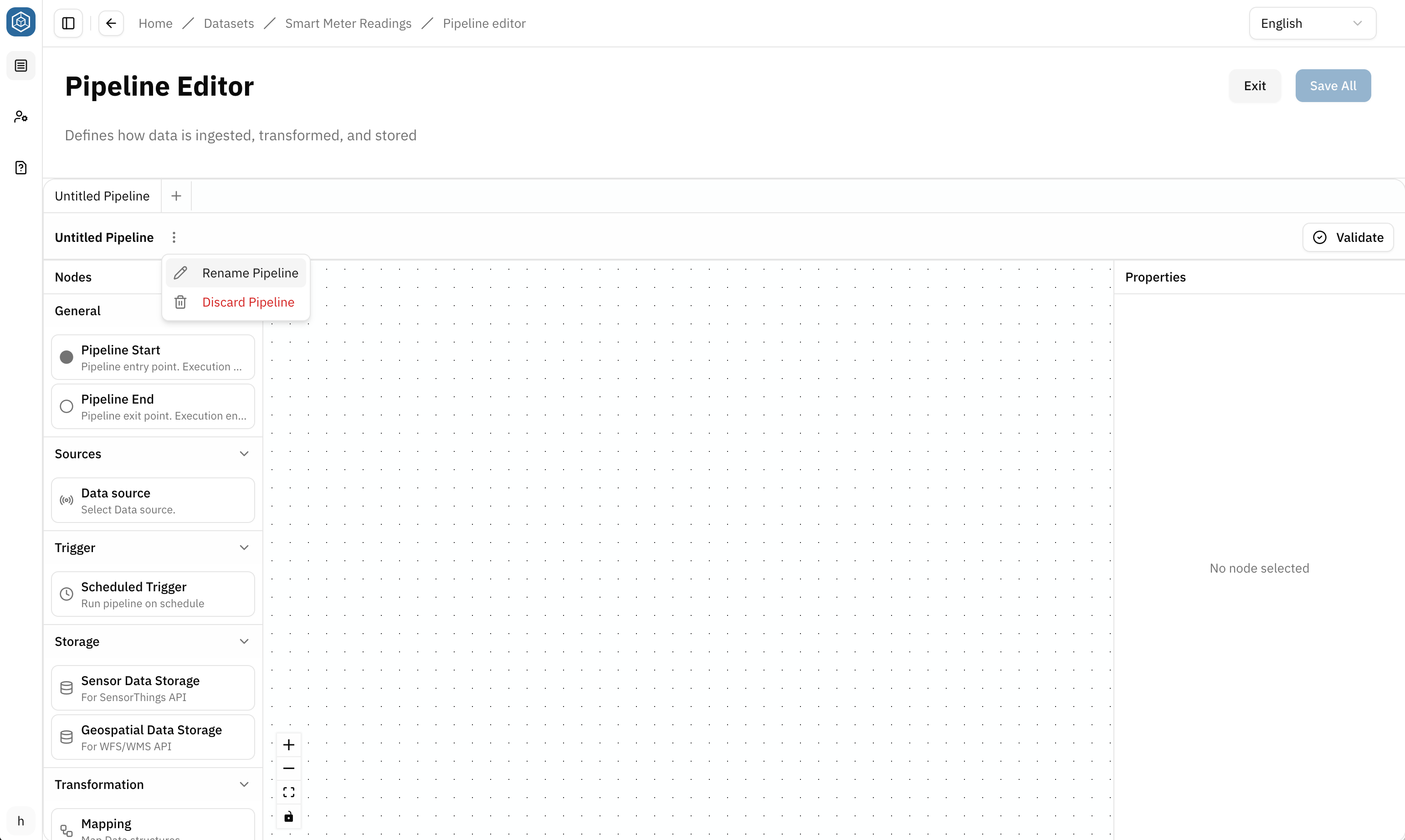
You can add, configure, move, and connect nodes freely on the canvas. Nodes and connections can be removed by selecting them and pressing the Delete key.
The editor consists of three main areas:
- Nodes panel: contains the available node types
- Canvas: used to arrange and connect nodes into a Pipeline
- Properties panel: displays the configuration of the selected node
Work with multiple Pipelines
Pipelines are organized in tabs at the top of the editor.
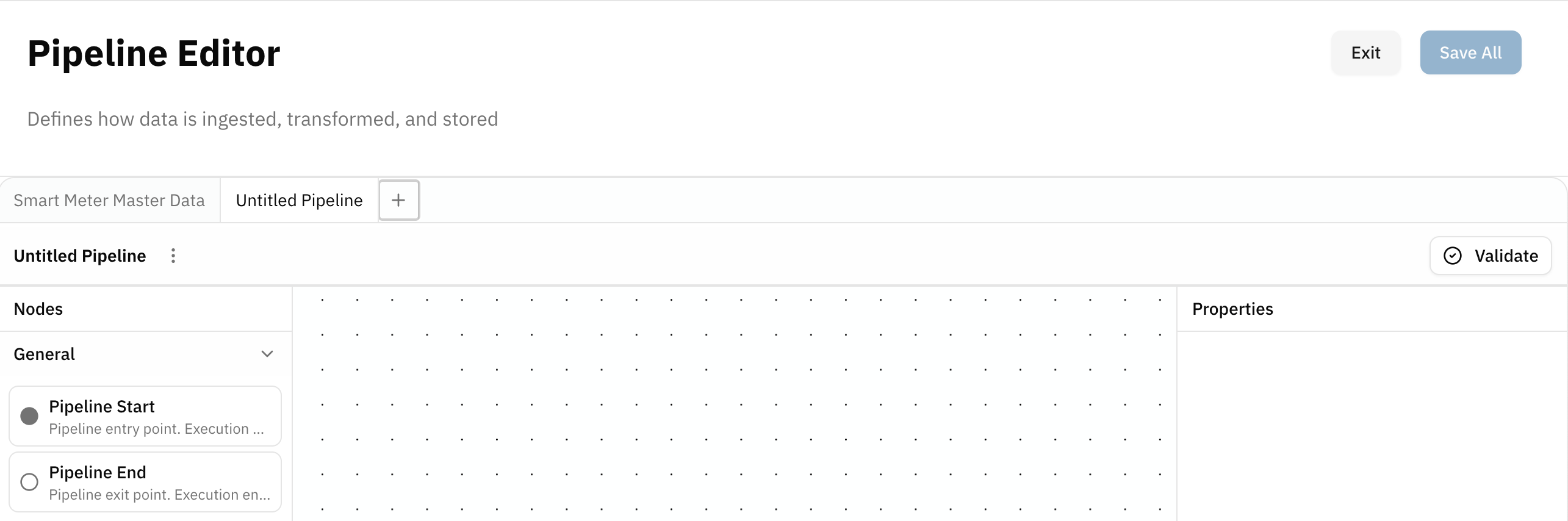
Select + next to the tabs to add another Pipeline. This allows a DatasetDatasetA data-related element that contains processed data and makes it available for consumption. A Dataset is populated via Pipelines and carries Metadata and access permissions. to contain multiple independent Pipelines.
To rename a Pipeline:
- Open the ellipsis menu next to the Pipeline name
- Select Rename
- Enter the new name
- Press Enter or click outside the input field to confirm
Understand the Pipeline structure
Every Pipeline has a defined start and end:
- Pipeline Start: marks the entry point of the Pipeline
- Pipeline End: marks the end of the Pipeline
Between these nodes, you define how data is ingested, transformed, and stored.
A Pipeline can:
- ingest data from a Data sourceData sourceA data-related element that represents the origin of data. It defines how data is connected, accessed, and ingested into the Platform, such as an external database or sensor network.
- run automatically using a Scheduled Trigger
- transform data using a Mapping
- store data in a Data storage
Example:
Pipeline Start → Data source → Mapping → Data storage → Pipeline End
All nodes must be correctly connected and configured before the Pipeline can be validated.
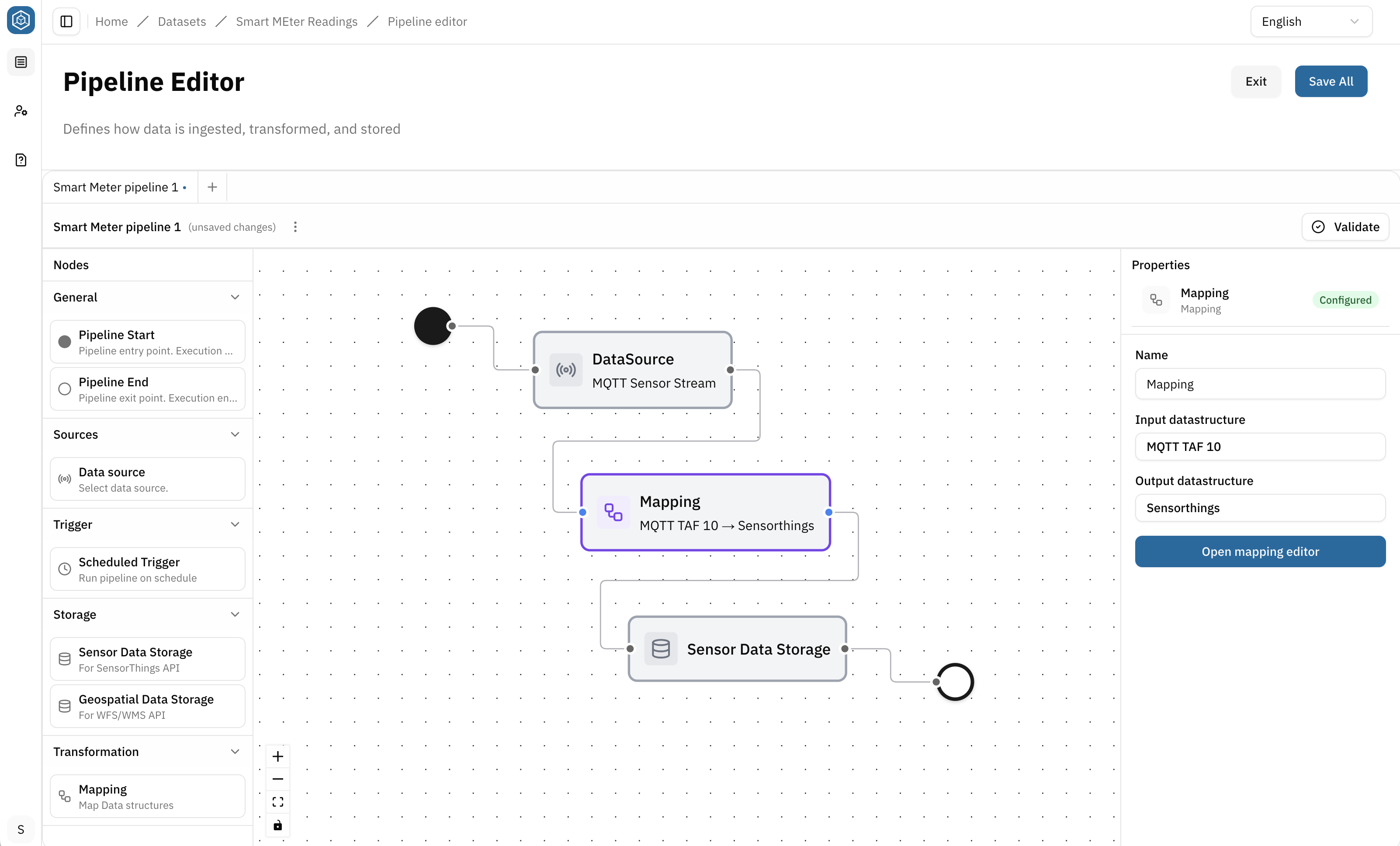
Configure Pipeline nodes
Data source
The Data sourceData sourceA data-related element that represents the origin of data. It defines how data is connected, accessed, and ingested into the Platform, such as an external database or sensor network. node defines where the Pipeline reads its input data from.
Select the node to configure it in the Properties panel. Choose a Data sourceData sourceA data-related element that represents the origin of data. It defines how data is connected, accessed, and ingested into the Platform, such as an external database or sensor network. from the Platform.
The Properties panel also provides information about the selected Data sourceData sourceA data-related element that represents the origin of data. It defines how data is connected, accessed, and ingested into the Platform, such as an external database or sensor network., including:
- Connector
- Status
- Description
Select Show Data Structure to inspect the Data structure used by the Data sourceData sourceA data-related element that represents the origin of data. It defines how data is connected, accessed, and ingested into the Platform, such as an external database or sensor network..
Scheduled Trigger
The Scheduled Trigger runs the Pipeline automatically according to a defined schedule.
Enter a CRON expression to define when the Pipeline should run.
CIVITAS/CORE uses CRON expressions with six fields and no year. For weekdays, names (MON–SUN) are recommended. Numbers from 0–7 can also be used, with 0 and 7 representing Sunday.
Sensor Data Storage
The Sensor Data storage node stores sensor data for access through the SensorThings APISensorThings APIA standardized API based on the OGC SensorThings API specification for accessing time series and IoT data. It enables structured retrieval and management of observations and related entities..
Select the node and choose a Port in the Properties panel. The Port determines how the incoming data is stored and which SensorThings entities are created or updated.
A Port is required to complete the node configuration.
Learn how to choose a Port, configure the required Mapping, map references and Locations, and provide access through a SensorThings APISensorThings APIA standardized API based on the OGC SensorThings API specification for accessing time series and IoT data. It enables structured retrieval and management of observations and related entities.. → Work with sensor Data
Geospatial Data Storage
The Geospatial Data Storage node persists geospatial data and makes it available for use by WFS/WMS APIsWFS/WMS APIA standardized geospatial API that makes spatial data available through Web Feature Service (WFS) and Web Map Service (WMS). It enables applications to access geographic features and map visualizations from a Dataset. Both are standards of the Open Geospatial Consortium (OGC)..
To configure the node:
- Enter a Table Name
- Select the Data structure version whose data should be stored
Each Geospatial Data Storage creates a target table based on its assigned Data structure.
A Pipeline can contain multiple Geospatial Data Storage nodes if data needs to be stored in multiple tables.
The selected Data structure version must contain the geometry information required for the intended geospatial use case.
For details about geometry Attributes, coordinate reference systems, Layers, bounding boxes, and Styles: → Work with geospatial Data.
Mapping
A Mapping transforms data from an input Data structure into an output Data structure.
Use a Mapping between nodes that work with different Data structures so that the data produced by one node can be transformed into the structure required by the next.
To create a Mapping:
- Add a Mapping node to the Pipeline
- Select the Mapping node
- Choose an input Data structure version
- Choose an output Data structure version
- Open the Mapping Canvas
Assign input and output Data structures, connect Attributes, and apply transformations where required. → Create Mappings
Work with Draft dependencies
While a DatasetDatasetA data-related element that contains processed data and makes it available for consumption. A Dataset is populated via Pipelines and carries Metadata and access permissions. is in Draft status, Pipelines can use Data sourcesData sourceA data-related element that represents the origin of data. It defines how data is connected, accessed, and ingested into the Platform, such as an external database or sensor network. and Data structure versions that are also in Draft.
This supports iterative development across related elements. For example, a Draft Data structure version used by a Mapping can be edited in another browser tab. Changes to the structure definition are then reflected in the Pipeline configuration.
The same applies to Draft Data sourcesData sourceA data-related element that represents the origin of data. It defines how data is connected, accessed, and ingested into the Platform, such as an external database or sensor network. used by a Pipeline.
→ Learn more about Status lifecycle and iterative workflows
All data-realated elements used by the DatasetDatasetA data-related element that contains processed data and makes it available for consumption. A Dataset is populated via Pipelines and carries Metadata and access permissions. must meet the requirements for release. Make sure that the Data sourcesData sourceA data-related element that represents the origin of data. It defines how data is connected, accessed, and ingested into the Platform, such as an external database or sensor network. and Data structure versions used by its Pipelines are released before releasing the DatasetDatasetA data-related element that contains processed data and makes it available for consumption. A Dataset is populated via Pipelines and carries Metadata and access permissions..
Update Pipelines
Pipelines can be updated while the DatasetDatasetA data-related element that contains processed data and makes it available for consumption. A Dataset is populated via Pipelines and carries Metadata and access permissions. is in Draft status.
Some nodes can become restricted after they are used by other parts of the DatasetDatasetA data-related element that contains processed data and makes it available for consumption. A Dataset is populated via Pipelines and carries Metadata and access permissions. or after infrastructure has been provisioned.
Data storages used by APIs
A Data storage cannot be removed if it is required by an existing API.
- A Sensor Data storage may be required by a SensorThings APISensorThings APIA standardized API based on the OGC SensorThings API specification for accessing time series and IoT data. It enables structured retrieval and management of observations and related entities.
- A Geospatial Data storage may be required by a WFS/WMS APIWFS/WMS APIA standardized geospatial API that makes spatial data available through Web Feature Service (WFS) and Web Map Service (WMS). It enables applications to access geographic features and map visualizations from a Dataset. Both are standards of the Open Geospatial Consortium (OGC).
Delete the corresponding API before removing the Data storage or a Pipeline containing it.
Geospatial Data storage used by API Layers
If a Geospatial Data storage is already used by one or more Layers, its Data structure can no longer be changed and the Pipeline containing it cannot be deleted. The node can still be updated where this does not affect the existing Layer configuration, for example by changing the table name.
Remove the assignment from the dependent Layers before changing the Data structure or deleting the Pipeline.
Provisioned Data storages
When a DatasetDatasetA data-related element that contains processed data and makes it available for consumption. A Dataset is populated via Pipelines and carries Metadata and access permissions. is released, the infrastructure required by its Pipeline is provisioned. If the DatasetDatasetA data-related element that contains processed data and makes it available for consumption. A Dataset is populated via Pipelines and carries Metadata and access permissions. is later returned to Draft, an already provisioned Data storage remains restricted. It can no longer be edited or removed individually from the Pipeline.
To remove a provisioned Data storage, the entire Pipeline must be deleted. Existing API or Layer dependencies must be removed first.
Validate a Pipeline
Before saving a Pipeline, select Validate in the upper-right corner of the canvas.
Validation checks whether the Pipeline is correctly configured and whether the required nodes and connections are present.
A Pipeline can currently only be saved if it passes validation.
Summary
You have learned how to:
- create and organize Pipelines within a DatasetDatasetA data-related element that contains processed data and makes it available for consumption. A Dataset is populated via Pipelines and carries Metadata and access permissions.
- use the Pipeline canvas
- configure Data sourcesData sourceA data-related element that represents the origin of data. It defines how data is connected, accessed, and ingested into the Platform, such as an external database or sensor network., Triggers, Data storages, and Mappings
- work with Draft dependencies
- understand restrictions on Data storages that are already in use or provisioned
- validate a Pipeline