Persist, transform & provide Data
Role: Data Architect, Data Steward
Goal: You want to build pipelines, transform and persist data, and make it available for consumption through an API.
Required Permissions:
- Data Permissions: Create, Read, and Update DatasetDatasetA data-related element that contains processed data and makes it available for consumption. A Dataset is populated via Pipelines and carries Metadata and access permissions.; Read Data sourceData sourceA data-related element that represents the origin of data. It defines how data is connected, accessed, and ingested into the Platform, such as an external database or sensor network.; Read Data structureData structureA versioned data-related element that defines the schema and organization of data. It specifies how data is structured and interpreted within the Platform.
- System Permissions: Read Group, Read Role
What you will achieve
After completing this guide, you will have:
- Created a DatasetDatasetA data-related element that contains processed data and makes it available for consumption. A Dataset is populated via Pipelines and carries Metadata and access permissions.
- Defined and validated a Pipeline
- Created a Mapping
- Defined an API
- Managed optionally access permissions
- Set the DatasetDatasetA data-related element that contains processed data and makes it available for consumption. A Dataset is populated via Pipelines and carries Metadata and access permissions. status to mark it as Ready
Before you start
- Verify that you can create DatasetsDatasetA data-related element that contains processed data and makes it available for consumption. A Dataset is populated via Pipelines and carries Metadata and access permissions.. If this option is unavailable, contact your TenantTenantAn isolated organizational partition that owns Data pools, Datasets, Users, Groups, and Roles. All access rules exist within their Tenant, and the Tenant is the widest Scope of a Role. Currently, one Tenant corresponds to the Platform. Admin to request access.
Understand your data flow
Before building a pipeline, make sure you understand how your data flows through the system. In CIVITAS/CORE, data is processed and stored through Pipelines before it can be made available through an API.
This means:
- data is ingested from a Data sourceData sourceA data-related element that represents the origin of data. It defines how data is connected, accessed, and ingested into the Platform, such as an external database or sensor network.
- transformed where required
- stored in a Data storageData storageA Pipeline node that persists data inside the Platform so that it can be provided through an API. The Platform offers the Sensor Data storage, which stores sensor data for the SensorThings API, and the Geospatial Data storage, which stores geospatial data in tables for WFS/WMS APIs. The Data storages used in the Pipelines of a Dataset determine which API types the Dataset can offer.
- provided for consumption through an API
In this guide, we demonstrate how to persist and transform data using this example use case. It shows how master data and measurement data are processed in pipelines and stored in a Sensor Data storageData storageA Pipeline node that persists data inside the Platform so that it can be provided through an API. The Platform offers the Sensor Data storage, which stores sensor data for the SensorThings API, and the Geospatial Data storage, which stores geospatial data in tables for WFS/WMS APIs. The Data storages used in the Pipelines of a Dataset determine which API types the Dataset can offer. and provided through a SensorThings APISensorThings APIA standardized API based on the OGC SensorThings API specification for accessing time series and IoT data. It enables structured retrieval and management of observations and related entities..
→ You will find additional context from the Smart Meter energy use case in the highlighted boxes throughout this guide.
Requirements
Two types of data are processed:
- Master data → used to create SensorThings entities such as Things and Datastreams
- Measurement data → continuous smart meter values received via MQTT
Pipelines are used to:
- load data from Data sourcesData sourceA data-related element that represents the origin of data. It defines how data is connected, accessed, and ingested into the Platform, such as an external database or sensor network.
- transform and map the data
- provide the data for further use
Make sure you have:
- Data sourcesData sourceA data-related element that represents the origin of data. It defines how data is connected, accessed, and ingested into the Platform, such as an external database or sensor network. for master data and measurement data
→ Before measurement data can be stored, the required SensorThings entities must exist. In this guide, you will build pipelines to process both data flows.
Step-by-step guide
Step 1: Create a Dataset
- Go to DatasetsDatasetA data-related element that contains processed data and makes it available for consumption. A Dataset is populated via Pipelines and carries Metadata and access permissions.
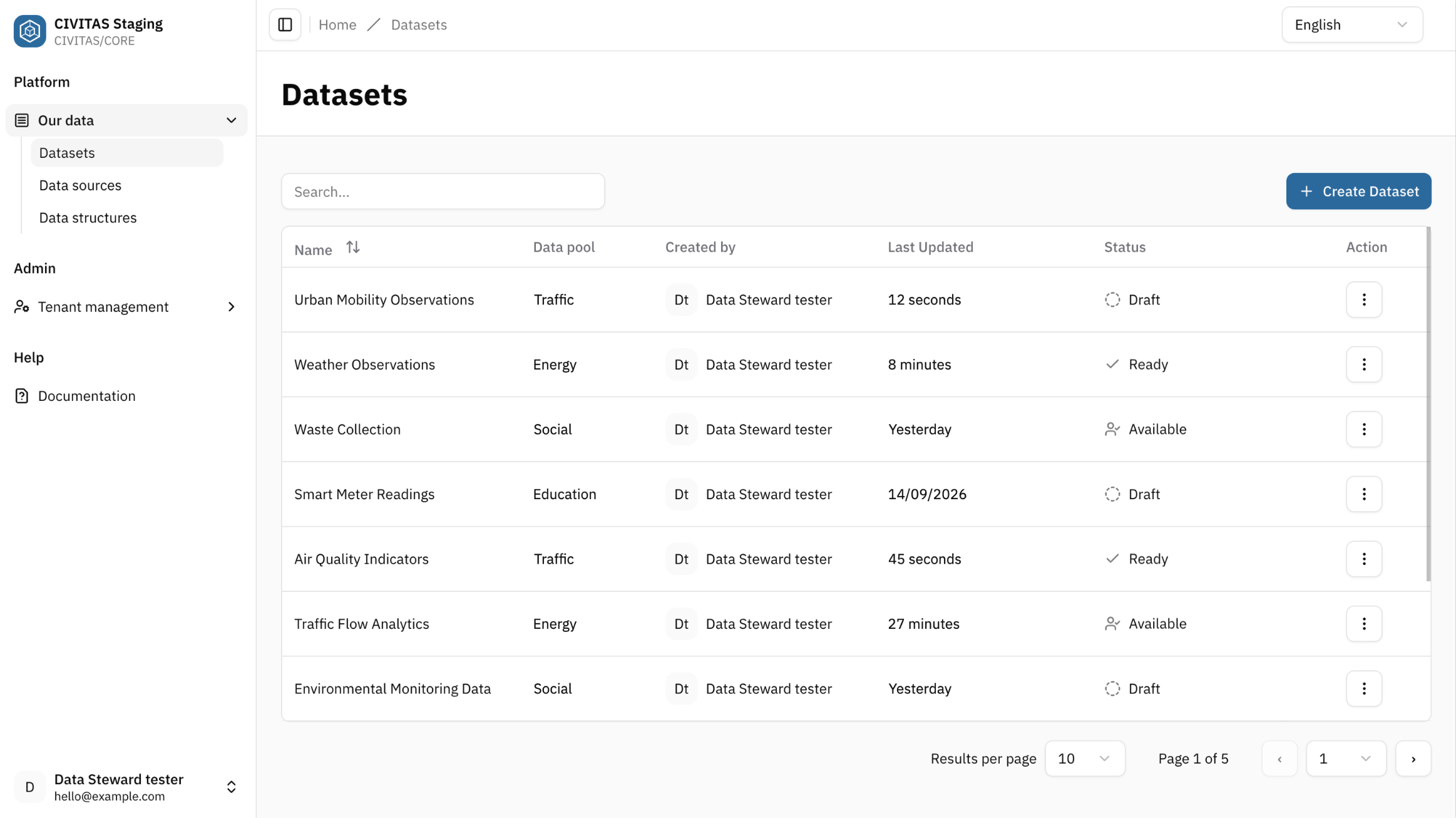
- Click Create DatasetDatasetA data-related element that contains processed data and makes it available for consumption. A Dataset is populated via Pipelines and carries Metadata and access permissions.
- Enter the Base Information and click Create and continue
Create a DatasetDatasetA data-related element that contains processed data and makes it available for consumption. A Dataset is populated via Pipelines and carries Metadata and access permissions. to combine and process smart meter data from different Data sourcesData sourceA data-related element that represents the origin of data. It defines how data is connected, accessed, and ingested into the Platform, such as an external database or sensor network..
Example name:
- Smart Meter energy usage
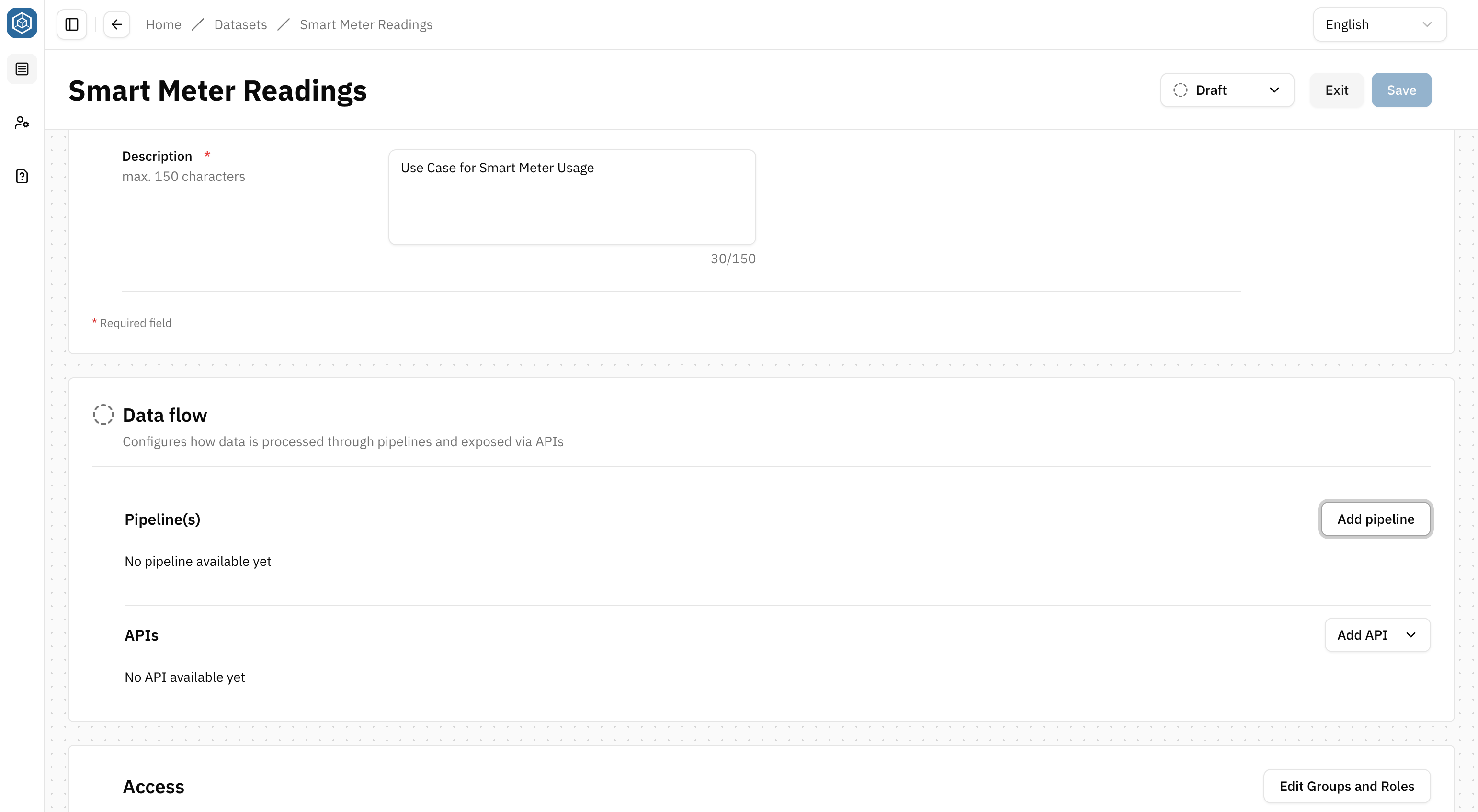
Step 2: Define a pipeline in the Dataset
→ A pipeline is an automated sequence of steps used to ingest, transform, or store data within the Platform.
- Click Add pipeline in the section Data flow
-
Open the actions menu
⋮next to the Pipeline name and select RenameIt helps you identify and manage multiple pipelines within a DatasetDatasetA data-related element that contains processed data and makes it available for consumption. A Dataset is populated via Pipelines and carries Metadata and access permissions..
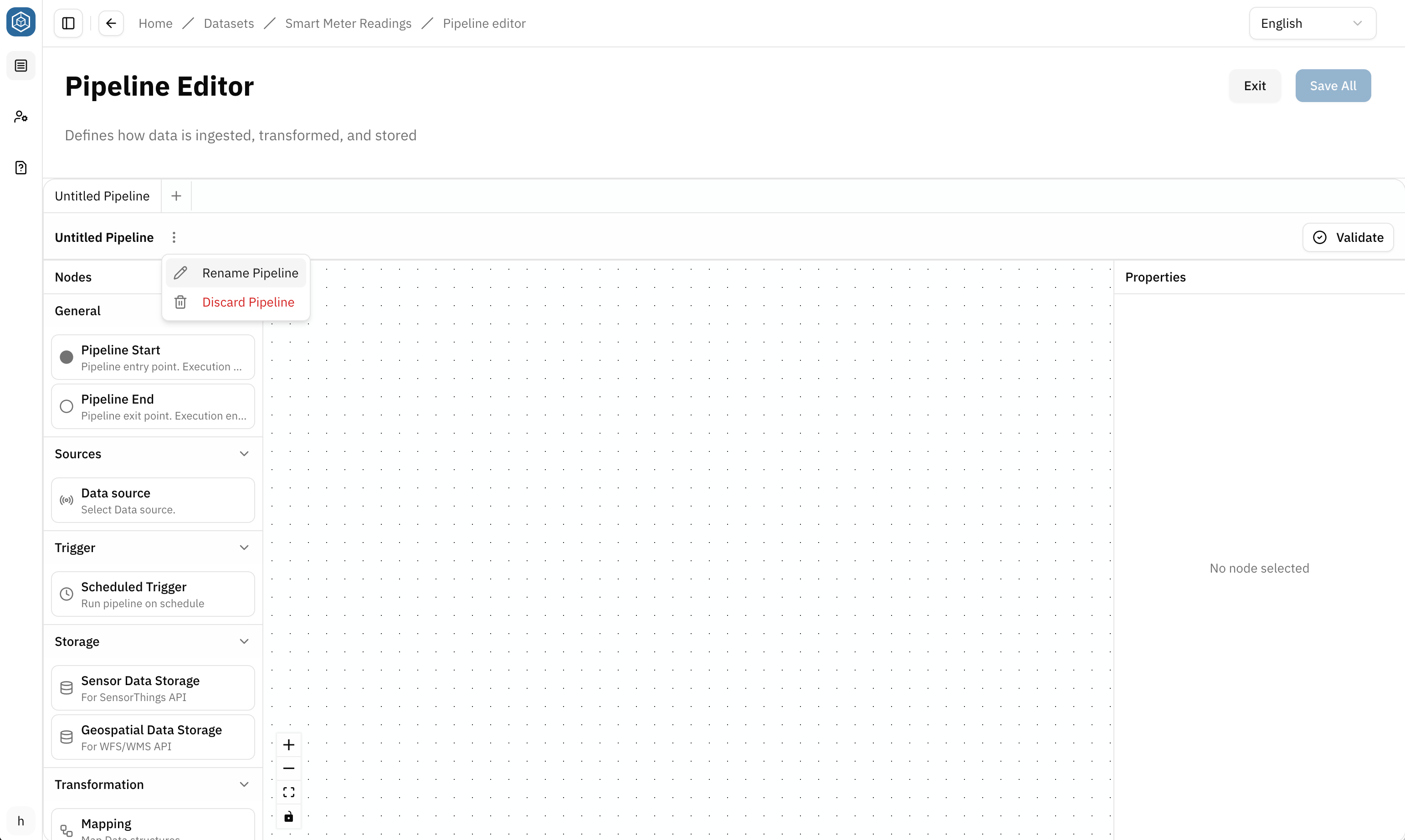
- Add nodes to the canvas
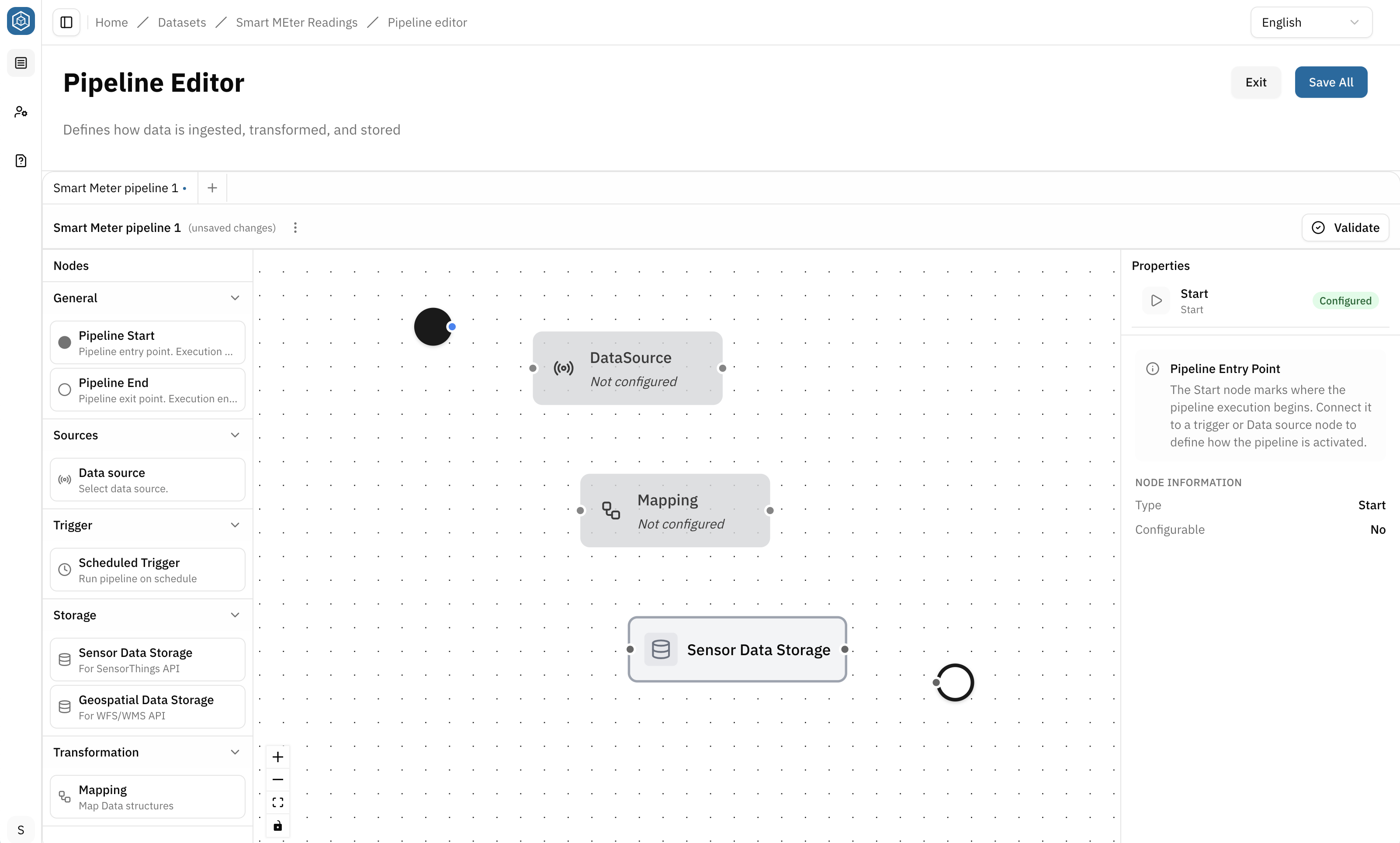
Create and connect nodes, configure Data sourcesData sourceA data-related element that represents the origin of data. It defines how data is connected, accessed, and ingested into the Platform, such as an external database or sensor network. and Storage nodes, and define how data flows through a Pipeline. → Build Pipelines
- Click on a node to configure it based on your use case
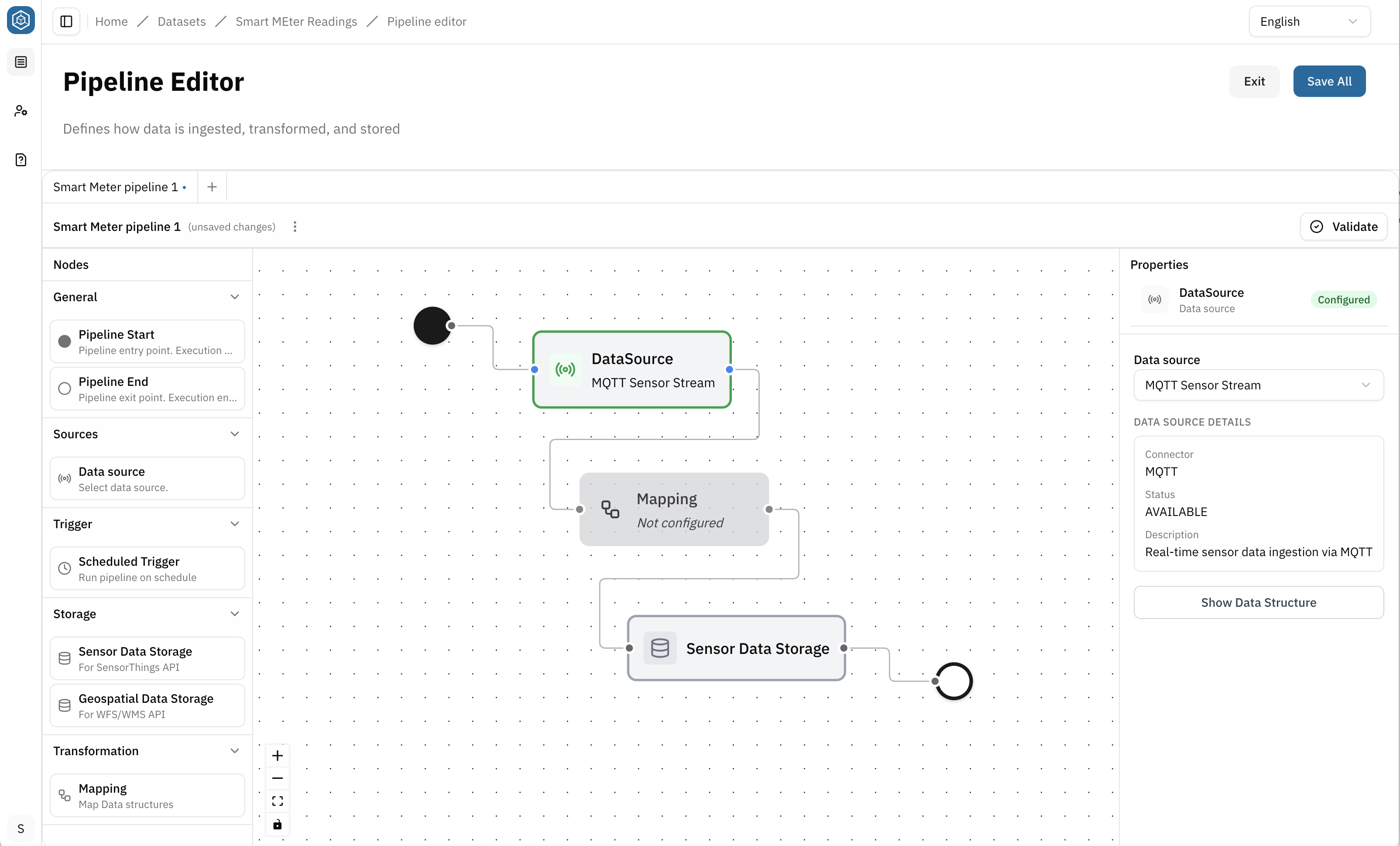
Assign input and output Data structuresData structureA versioned data-related element that defines the schema and organization of data. It specifies how data is structured and interpreted within the Platform., connect Attributes, and apply transformations where required. → Create Mappings
- Connect all nodes to complete the pipeline
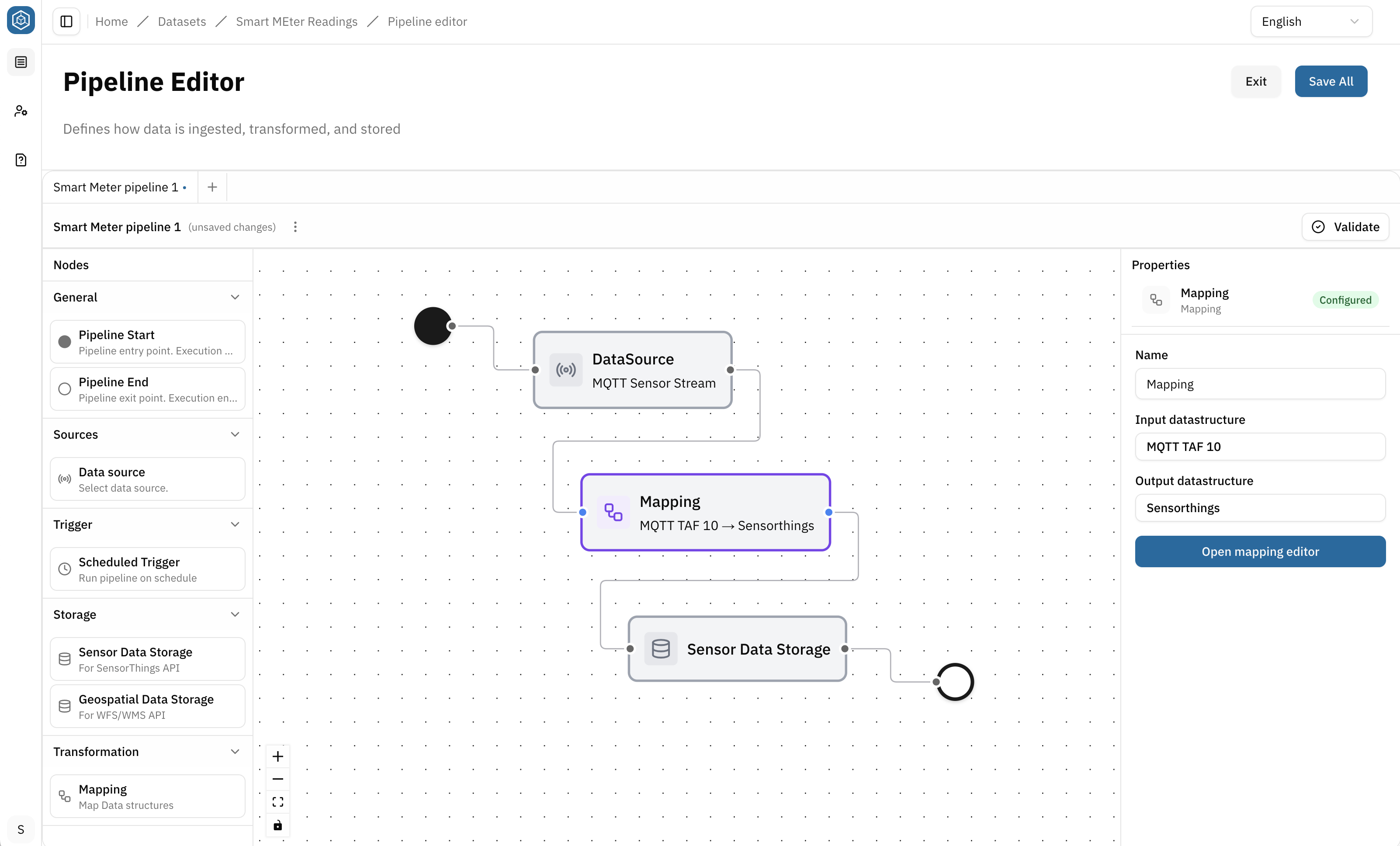
-
Click Validate to ensure that all nodes are correctly configured and connected
-
Fix any issues if needed, then hit Save and turn back to the detail view of the DatasetDatasetA data-related element that contains processed data and makes it available for consumption. A Dataset is populated via Pipelines and carries Metadata and access permissions.
After closing the Pipeline Editor, a new pipeline tile is created in the Pipelines section of the DatasetDatasetA data-related element that contains processed data and makes it available for consumption. A Dataset is populated via Pipelines and carries Metadata and access permissions. overview.
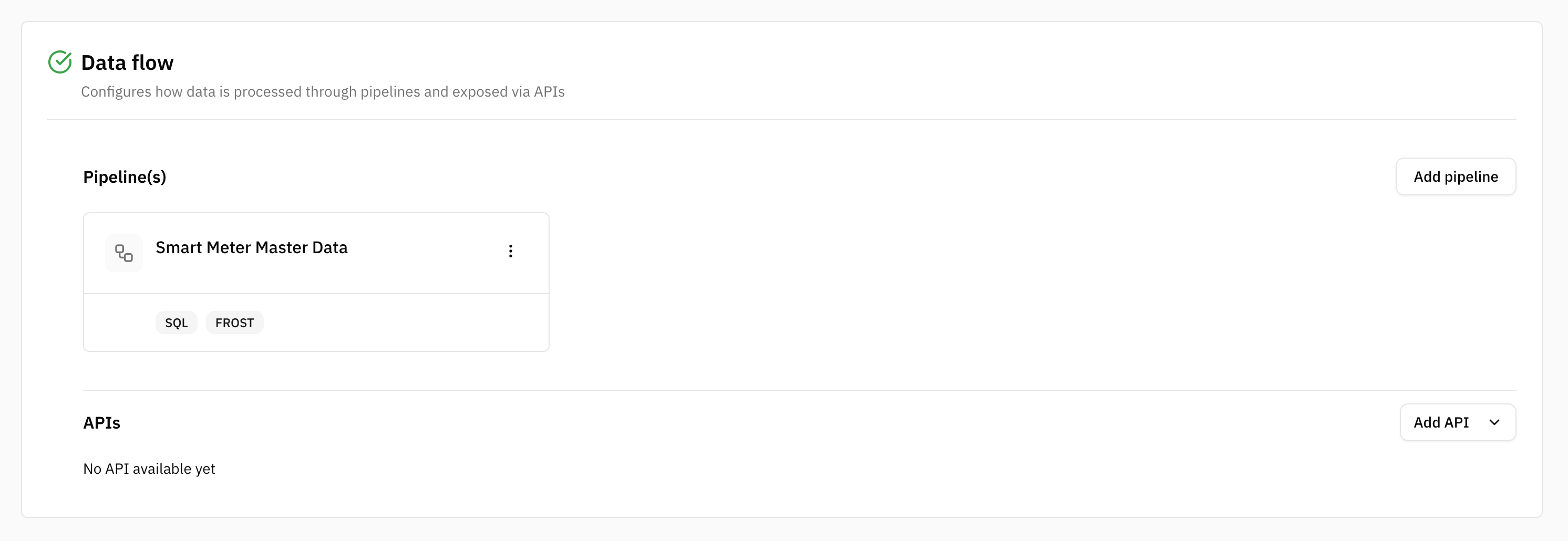
The tile displays:
- Pipeline name
- Data sourceData sourceA data-related element that represents the origin of data. It defines how data is connected, accessed, and ingested into the Platform, such as an external database or sensor network. Connector types used in the Pipeline
- Data storageData storageA Pipeline node that persists data inside the Platform so that it can be provided through an API. The Platform offers the Sensor Data storage, which stores sensor data for the SensorThings API, and the Geospatial Data storage, which stores geospatial data in tables for WFS/WMS APIs. The Data storages used in the Pipelines of a Dataset determine which API types the Dataset can offer. types used in the Pipeline
- Pipeline status If the Pipeline encounters an error, an Error status badge is displayed. Once the DatasetDatasetA data-related element that contains processed data and makes it available for consumption. A Dataset is populated via Pipelines and carries Metadata and access permissions. is Available and the Pipeline is running, the tile displays an Active status badge.
Edit the Pipeline:
- Select the tile to open the Pipeline in the Pipeline Editor and continue editing it
Delete the Pipeline:
- Open the actions menu
⋮on the Pipeline tile and select Delete - Alternatively, open the Pipeline and select Delete from the actions menu
⋮next to the Pipeline name
A Pipeline may not be deleted while one of its Data storageData storageA Pipeline node that persists data inside the Platform so that it can be provided through an API. The Platform offers the Sensor Data storage, which stores sensor data for the SensorThings API, and the Geospatial Data storage, which stores geospatial data in tables for WFS/WMS APIs. The Data storages used in the Pipelines of a Dataset determine which API types the Dataset can offer. nodes is in use by an existing API. In this case, follow the instructions in the UI to resolve the dependency before deleting the Pipeline.
This use case requires two pipelines within the same DatasetDatasetA data-related element that contains processed data and makes it available for consumption. A Dataset is populated via Pipelines and carries Metadata and access permissions.:
- a master data pipeline
- a measurement data pipeline
Pipeline 1:
Start with the master data pipeline and follow the steps above. Use the configuration below as a reference.
Example pipeline name: Smart Meter Master Data
Pipeline structure: Pipeline Start → Scheduled Trigger → Data sourceData sourceA data-related element that represents the origin of data. It defines how data is connected, accessed, and ingested into the Platform, such as an external database or sensor network. → Mapping → Sensor Data storageData storageA Pipeline node that persists data inside the Platform so that it can be provided through an API. The Platform offers the Sensor Data storage, which stores sensor data for the SensorThings API, and the Geospatial Data storage, which stores geospatial data in tables for WFS/WMS APIs. The Data storages used in the Pipelines of a Dataset determine which API types the Dataset can offer. → Pipeline End
Schedulded Trigger node: Defines when the pipeline runs. For example every 30 seconds:
*/30 * * * * *
Data sourceData sourceA data-related element that represents the origin of data. It defines how data is connected, accessed, and ingested into the Platform, such as an external database or sensor network. node: Assign the PostgreSQL Data sourceData sourceA data-related element that represents the origin of data. It defines how data is connected, accessed, and ingested into the Platform, such as an external database or sensor network. created earlier.
Mapping node: Map the master data to the structure required by the ThingTree Port.
Sensor Data storageData storageA Pipeline node that persists data inside the Platform so that it can be provided through an API. The Platform offers the Sensor Data storage, which stores sensor data for the SensorThings API, and the Geospatial Data storage, which stores geospatial data in tables for WFS/WMS APIs. The Data storages used in the Pipelines of a Dataset determine which API types the Dataset can offer. node: Select the ThingTree Port.
Pipeline 2:
Now, open a new pipeline tab and define the measurement data pipeline. Follow the same steps as above and use the configuration below as a reference.
Example pipeline name: Smart Meter Measurement
Pipeline structure: Pipeline Start → Data sourceData sourceA data-related element that represents the origin of data. It defines how data is connected, accessed, and ingested into the Platform, such as an external database or sensor network. → Mapping → Sensor Data storageData storageA Pipeline node that persists data inside the Platform so that it can be provided through an API. The Platform offers the Sensor Data storage, which stores sensor data for the SensorThings API, and the Geospatial Data storage, which stores geospatial data in tables for WFS/WMS APIs. The Data storages used in the Pipelines of a Dataset determine which API types the Dataset can offer. → Pipeline End
Data sourceData sourceA data-related element that represents the origin of data. It defines how data is connected, accessed, and ingested into the Platform, such as an external database or sensor network. node: Assign the MQTT Data sourceData sourceA data-related element that represents the origin of data. It defines how data is connected, accessed, and ingested into the Platform, such as an external database or sensor network. created earlier.
Mapping node: Map the incoming measurement data to the structure required by the Observations Port.
Sensor Data Storage node: Select the Observations Port.
Step 3: Define an API
→ An API provides access to the Payload (actual Data) stored by a DatasetDatasetA data-related element that contains processed data and makes it available for consumption. A Dataset is populated via Pipelines and carries Metadata and access permissions. and allows consumers to retrieve it through a dedicated API URL.
Once a valid Pipeline exists and data is stored using a Storage node, an API can be created for the DatasetDatasetA data-related element that contains processed data and makes it available for consumption. A Dataset is populated via Pipelines and carries Metadata and access permissions..
To create an API
- Open the DatasetDatasetA data-related element that contains processed data and makes it available for consumption. A Dataset is populated via Pipelines and carries Metadata and access permissions.
- Navigate to Dataflow section → APIs
- Select Add API
- Choose an API type
- A form opens: Complete the required API configuration
- Hit Save
The available API types depend on the Data storageData storageA Pipeline node that persists data inside the Platform so that it can be provided through an API. The Platform offers the Sensor Data storage, which stores sensor data for the SensorThings API, and the Geospatial Data storage, which stores geospatial data in tables for WFS/WMS APIs. The Data storages used in the Pipelines of a Dataset determine which API types the Dataset can offer. nodes used in the DatasetDatasetA data-related element that contains processed data and makes it available for consumption. A Dataset is populated via Pipelines and carries Metadata and access permissions.'s Pipelines. An API type can only be selected if data is stored using a compatible Data storageData storageA Pipeline node that persists data inside the Platform so that it can be provided through an API. The Platform offers the Sensor Data storage, which stores sensor data for the SensorThings API, and the Geospatial Data storage, which stores geospatial data in tables for WFS/WMS APIs. The Data storages used in the Pipelines of a Dataset determine which API types the Dataset can offer. node.
Sensor Data storageData storageA Pipeline node that persists data inside the Platform so that it can be provided through an API. The Platform offers the Sensor Data storage, which stores sensor data for the SensorThings API, and the Geospatial Data storage, which stores geospatial data in tables for WFS/WMS APIs. The Data storages used in the Pipelines of a Dataset determine which API types the Dataset can offer. → SensorThings APISensorThings APIA standardized API based on the OGC SensorThings API specification for accessing time series and IoT data. It enables structured retrieval and management of observations and related entities.
Geospatial Data storageData storageA Pipeline node that persists data inside the Platform so that it can be provided through an API. The Platform offers the Sensor Data storage, which stores sensor data for the SensorThings API, and the Geospatial Data storage, which stores geospatial data in tables for WFS/WMS APIs. The Data storages used in the Pipelines of a Dataset determine which API types the Dataset can offer. → WFS/WMS APIWFS/WMS APIA standardized geospatial API that makes spatial data available through Web Feature Service (WFS) and Web Map Service (WMS). It enables applications to access geographic features and map visualizations from a Dataset. Both are standards of the Open Geospatial Consortium (OGC).
Each DatasetDatasetA data-related element that contains processed data and makes it available for consumption. A Dataset is populated via Pipelines and carries Metadata and access permissions. can have one SensorThings APISensorThings APIA standardized API based on the OGC SensorThings API specification for accessing time series and IoT data. It enables structured retrieval and management of observations and related entities. and one WFS/WMS APIWFS/WMS APIA standardized geospatial API that makes spatial data available through Web Feature Service (WFS) and Web Map Service (WMS). It enables applications to access geographic features and map visualizations from a Dataset. Both are standards of the Open Geospatial Consortium (OGC).. Multiple Data storageData storageA Pipeline node that persists data inside the Platform so that it can be provided through an API. The Platform offers the Sensor Data storage, which stores sensor data for the SensorThings API, and the Geospatial Data storage, which stores geospatial data in tables for WFS/WMS APIs. The Data storages used in the Pipelines of a Dataset determine which API types the Dataset can offer. nodes of the same type share the same API.
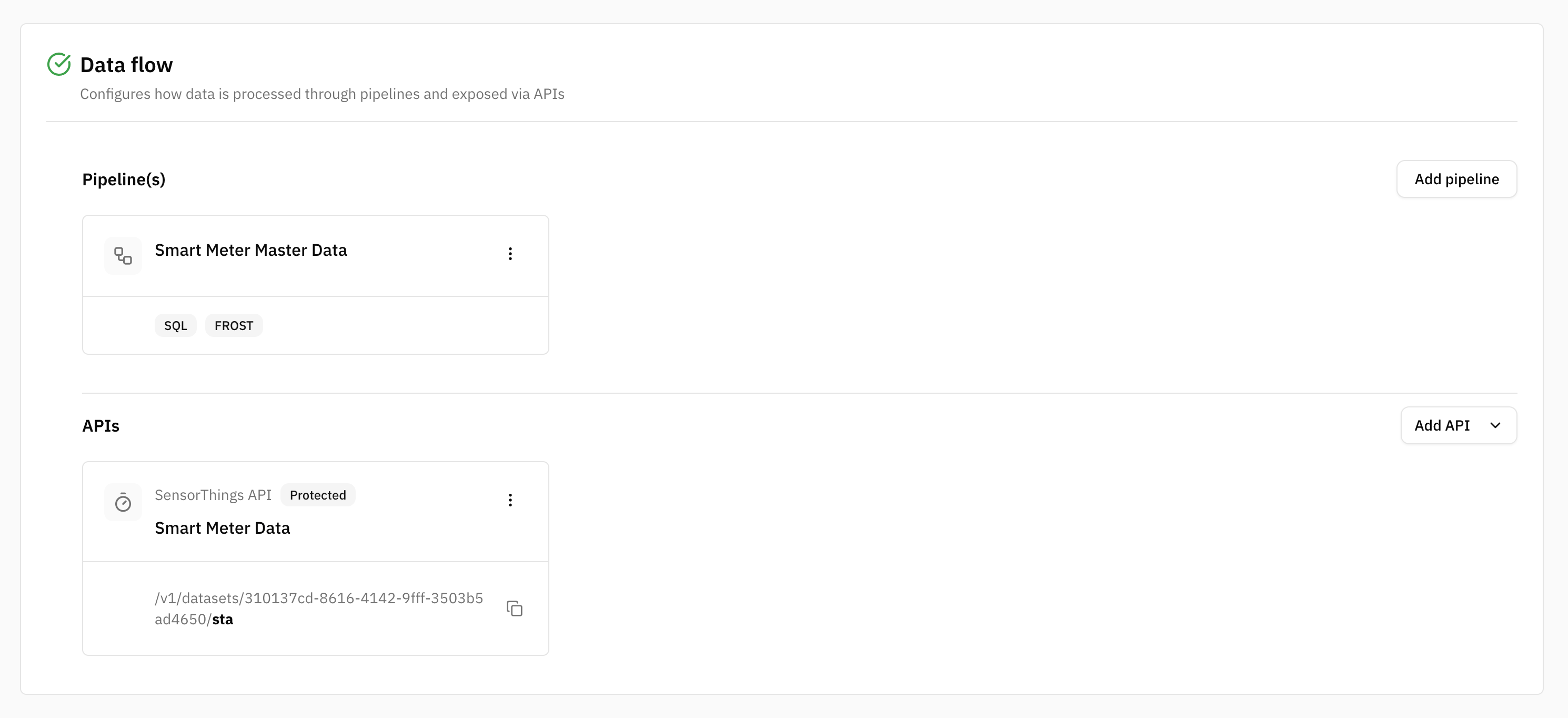
After closing the form, a new API tile is created in the APIs section of the DatasetDatasetA data-related element that contains processed data and makes it available for consumption. A Dataset is populated via Pipelines and carries Metadata and access permissions. overview.
The tile displays:
- API name
- type
- optional description
- API URL
→ The API URL can be copied and shared with consumers.
Edit the API:
- Select the tile to reopen the API configuration form and update its settings
Delete the API:
- open the actions menu
⋮on the API tile and select Delete
For this use case, select: SensorThings APISensorThings APIA standardized API based on the OGC SensorThings API specification for accessing time series and IoT data. It enables structured retrieval and management of observations and related entities. – Time-series Data. This API type provides access to the time-series data persisted by the Pipeline in the Sensor Data Storage node.
Step 4: Open and manage access of the Dataset
Permissions can be granted at different levels:
- Platform-wide through Data Roles assigned in TenantTenantAn isolated organizational partition that owns Data pools, Datasets, Users, Groups, and Roles. All access rules exist within their Tenant, and the Tenant is the widest Scope of a Role. Currently, one Tenant corresponds to the Platform. Management
- Through permission inheritance from the assigned Data poolData poolA governed, centralized collection of Datasets that are managed together within the Platform. It provides a shared place to organize, discover, and access data, including associated metadata, ownership, and access permissions. With Data pools users can cluster their Datasets according to their organizational structure (e.g., by Departments, Offices). Formerly called Data space.
- Directly on the DatasetDatasetA data-related element that contains processed data and makes it available for consumption. A Dataset is populated via Pipelines and carries Metadata and access permissions.
Configure permissions on the DatasetDatasetA data-related element that contains processed data and makes it available for consumption. A Dataset is populated via Pipelines and carries Metadata and access permissions. only when DatasetDatasetA data-related element that contains processed data and makes it available for consumption. A Dataset is populated via Pipelines and carries Metadata and access permissions.-specific access is required.
Required Permissions: Update DatasetDatasetA data-related element that contains processed data and makes it available for consumption. A Dataset is populated via Pipelines and carries Metadata and access permissions. is required to manage DatasetDatasetA data-related element that contains processed data and makes it available for consumption. A Dataset is populated via Pipelines and carries Metadata and access permissions.-specific access.
Adding a new Group–Role Assignment additionally requires the Read Group and Read Role system permissions. Existing Assignments can be removed with Update DatasetDatasetA data-related element that contains processed data and makes it available for consumption. A Dataset is populated via Pipelines and carries Metadata and access permissions. without these system permissions.
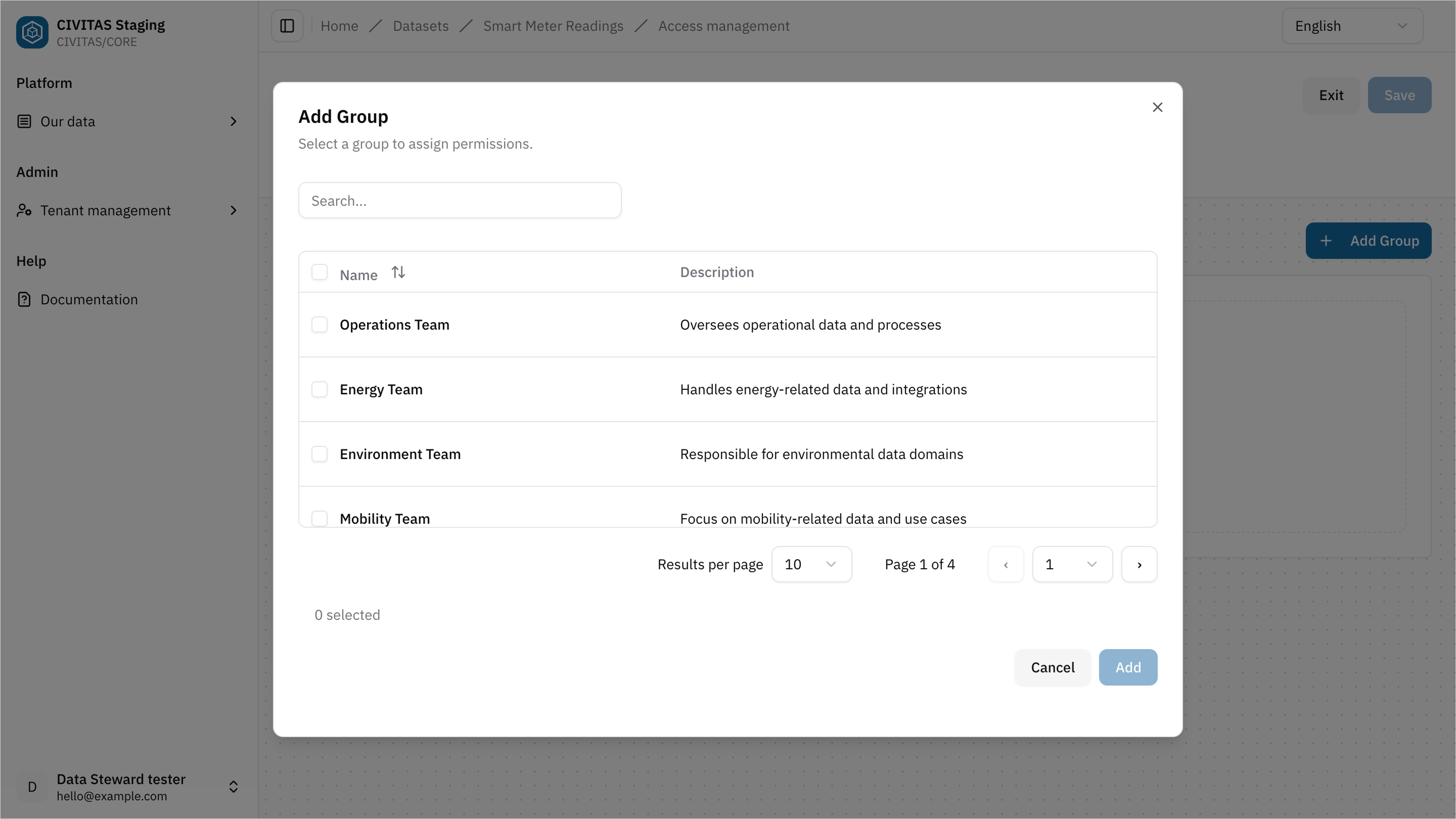
- Click Edit Groups and Roles in the section Access
- Add a Group
- Assign a Role to the Group
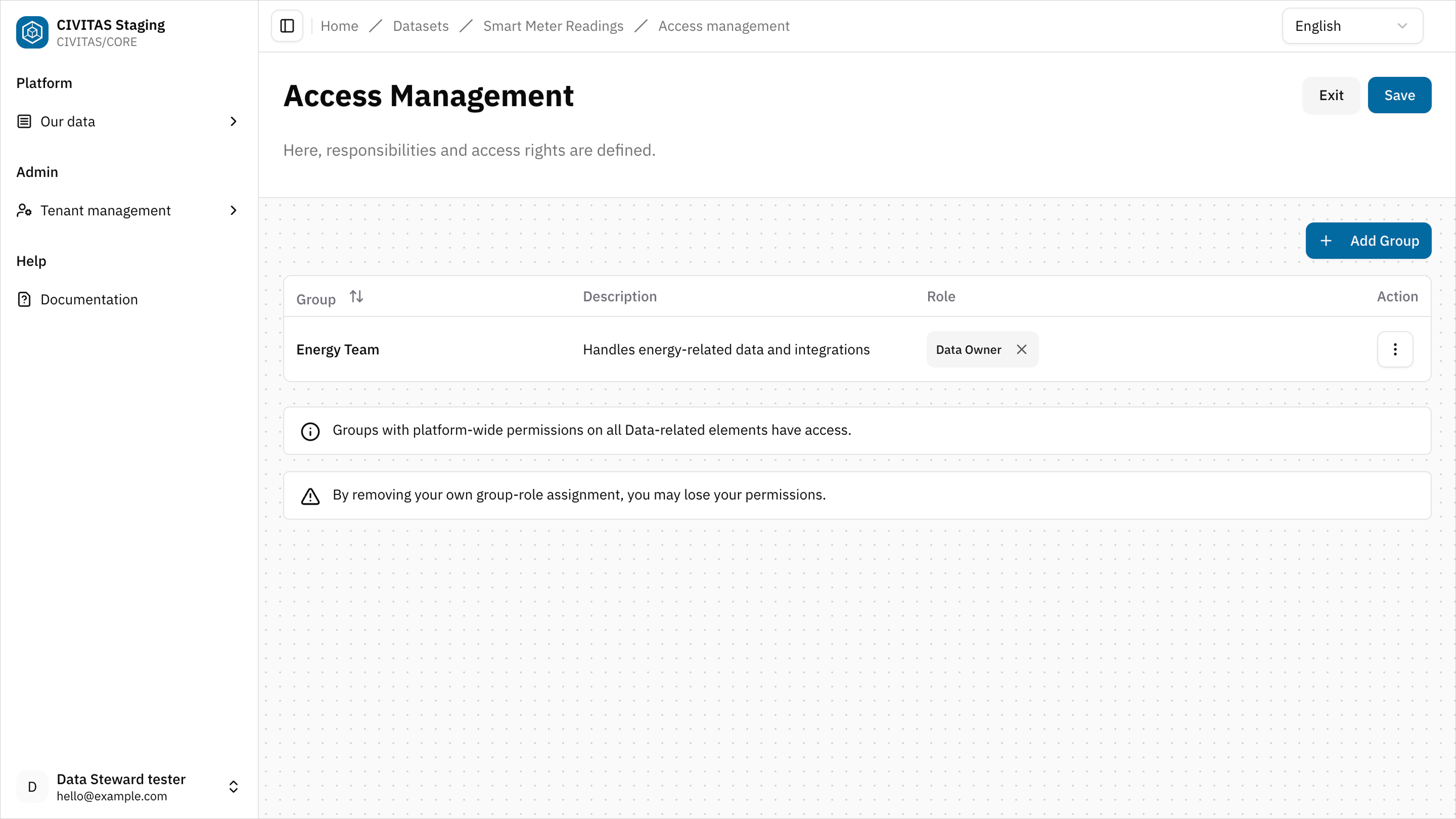
- Repeat these steps to add more Groups and Roles
- Hit Save and Turn back to the detail view of the DatasetDatasetA data-related element that contains processed data and makes it available for consumption. A Dataset is populated via Pipelines and carries Metadata and access permissions.
Step 5: Mark the Dataset as Ready
→ Setting the status to Ready signals that the DatasetDatasetA data-related element that contains processed data and makes it available for consumption. A Dataset is populated via Pipelines and carries Metadata and access permissions. setup is complete and can be reviewed for release.
- Change the status to Ready.
- Share a direct link to the DatasetDatasetA data-related element that contains processed data and makes it available for consumption. A Dataset is populated via Pipelines and carries Metadata and access permissions. with a Data Owner or Data Gatekeeper for review.
The review includes the DatasetDatasetA data-related element that contains processed data and makes it available for consumption. A Dataset is populated via Pipelines and carries Metadata and access permissions. and the dependent data-related elements it uses, such as Data structuresData structureA versioned data-related element that defines the schema and organization of data. It specifies how data is structured and interpreted within the Platform. and Data sourcesData sourceA data-related element that represents the origin of data. It defines how data is connected, accessed, and ingested into the Platform, such as an external database or sensor network..
Pipelines start processing data only after the DatasetDatasetA data-related element that contains processed data and makes it available for consumption. A Dataset is populated via Pipelines and carries Metadata and access permissions. has been released and its status has been changed to Available.
Outcome
The DatasetDatasetA data-related element that contains processed data and makes it available for consumption. A Dataset is populated via Pipelines and carries Metadata and access permissions. is Ready and can now be reviewed together with its dependent data-related elements and released.
Summary
You have successfully:
- Created a DatasetDatasetA data-related element that contains processed data and makes it available for consumption. A Dataset is populated via Pipelines and carries Metadata and access permissions.
- Built and validated Pipelines
- Created Mappings
- Added an API
- Configured access permissions
- Marked the DatasetDatasetA data-related element that contains processed data and makes it available for consumption. A Dataset is populated via Pipelines and carries Metadata and access permissions. as Ready
Next
You have completed the creation phase of your DatasetDatasetA data-related element that contains processed data and makes it available for consumption. A Dataset is populated via Pipelines and carries Metadata and access permissions..
In the next guide, you will:
- review the DatasetDatasetA data-related element that contains processed data and makes it available for consumption. A Dataset is populated via Pipelines and carries Metadata and access permissions. and its dependent data-related elements
- release required Data structuresData structureA versioned data-related element that defines the schema and organization of data. It specifies how data is structured and interpreted within the Platform. and Data sourcesData sourceA data-related element that represents the origin of data. It defines how data is connected, accessed, and ingested into the Platform, such as an external database or sensor network.
- set the DatasetDatasetA data-related element that contains processed data and makes it available for consumption. A Dataset is populated via Pipelines and carries Metadata and access permissions. to Available
→ Continue with Release Data