Design Data structures in the Data structure Editor
Role: Data Architect, Data Steward
Goal: You want to define reusable Data structuresData structureA versioned data-related element that defines the schema and organization of data. It specifies how data is structured and interpreted within the Platform. that can be used for Data sourcesData sourceA data-related element that represents the origin of data. It defines how data is connected, accessed, and ingested into the Platform, such as an external database or sensor network., Mappings, and Pipelines.
Required Permissions: update Data structureData structureA versioned data-related element that defines the schema and organization of data. It specifies how data is structured and interpreted within the Platform.
What you will learn
After completing this guide, you will understand how to:
- use the Data structureData structureA versioned data-related element that defines the schema and organization of data. It specifies how data is structured and interpreted within the Platform. canvas
- import and export Data structuresData structureA versioned data-related element that defines the schema and organization of data. It specifies how data is structured and interpreted within the Platform.
- use Standard structures
- create and organize Classes
- define a Root Class
- use Enums for predefined values
- add and describe Attributes
- connect Classes using Relationships
- define Cardinalities
- understand when a Data structureData structureA versioned data-related element that defines the schema and organization of data. It specifies how data is structured and interpreted within the Platform. Version is in use and how this affects editing
Before you start
A Data structureData structureA versioned data-related element that defines the schema and organization of data. It specifies how data is structured and interpreted within the Platform. describes the shape of your data independently of its source or storage. It defines how information is organized and serves as the foundation for Data sourcesData sourceA data-related element that represents the origin of data. It defines how data is connected, accessed, and ingested into the Platform, such as an external database or sensor network., Mappings, and Pipelines.
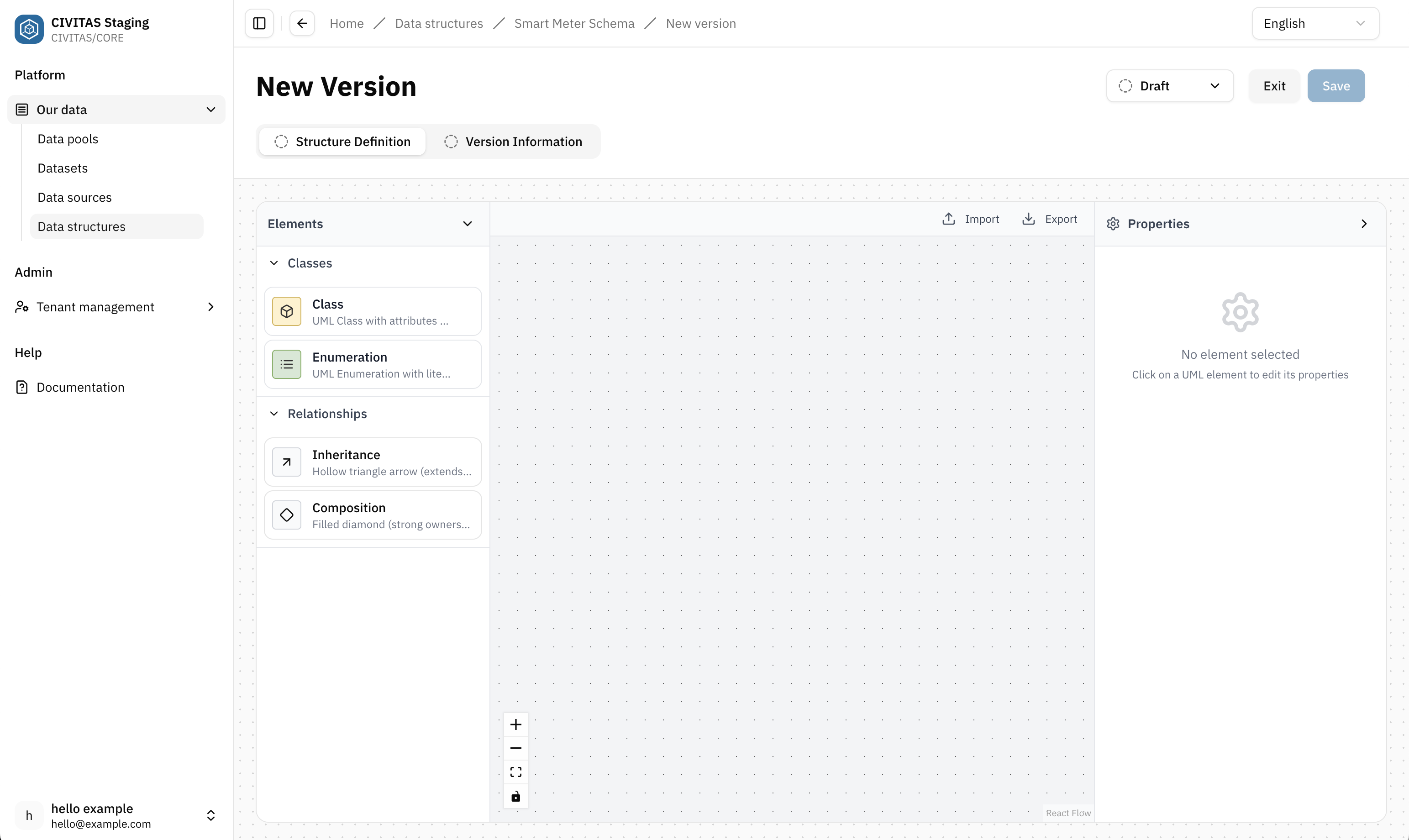
The Data structure canvas
The Data Structure canvas allows you to build Data structuresData structureA versioned data-related element that defines the schema and organization of data. It specifies how data is structured and interpreted within the Platform. visually. Elements are added by dragging them from the left sidebar onto the canvas and configured using the properties panel.
To start defining a Data structureData structureA versioned data-related element that defines the schema and organization of data. It specifies how data is structured and interpreted within the Platform.:
- Go to the Data structureData structureA versioned data-related element that defines the schema and organization of data. It specifies how data is structured and interpreted within the Platform. Version
- Open the Structure Definition
Import and export structures
Instead of defining a structure manually, you can import an existing structure or use one of the provided Standard structures.
Import from a file
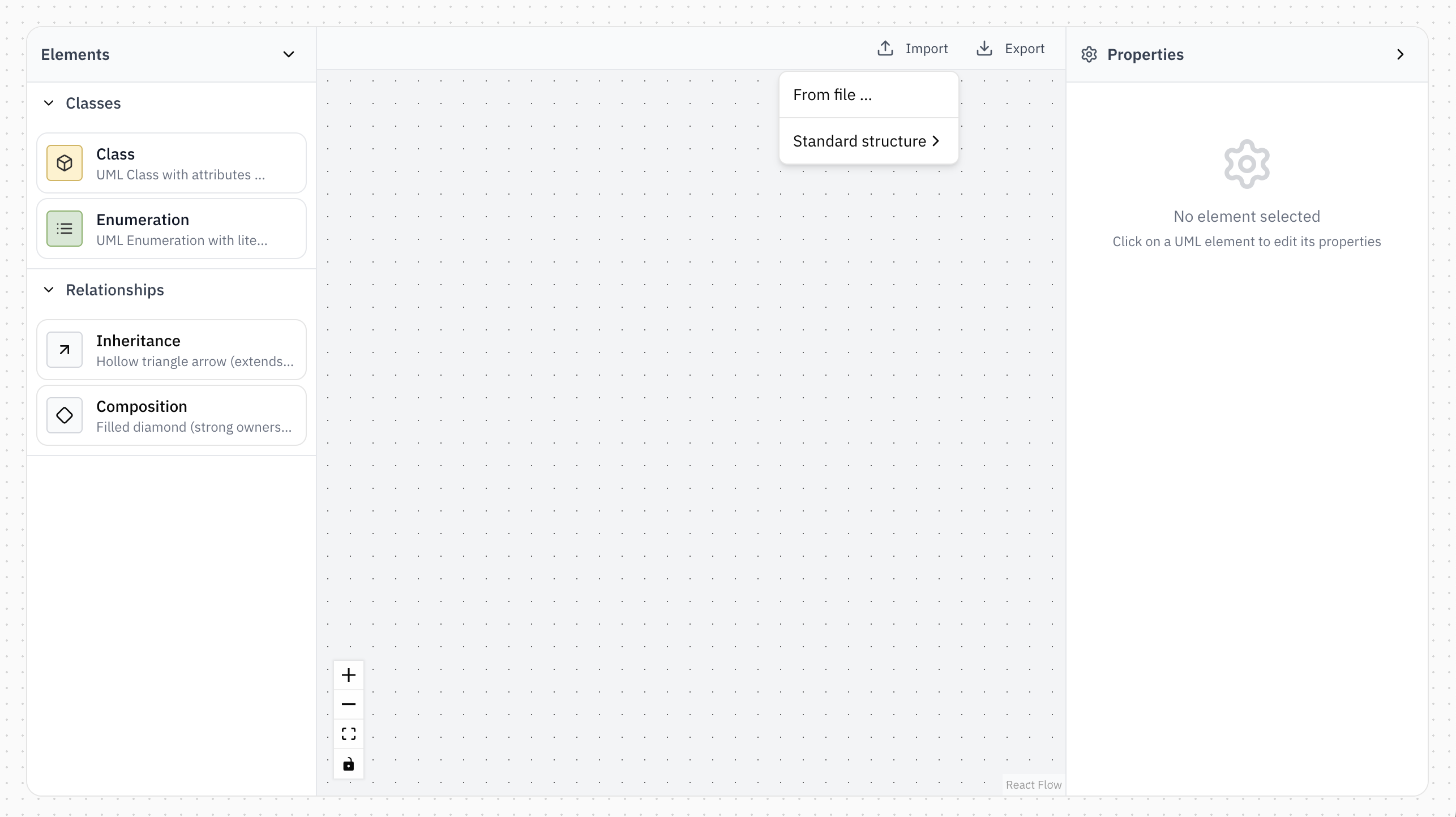
Select Import → From file ... to import a Data structureData structureA versioned data-related element that defines the schema and organization of data. It specifies how data is structured and interpreted within the Platform. from a JSON file.
During import, CIVITAS/CORE validates whether the file can be represented as a Data structureData structureA versioned data-related element that defines the schema and organization of data. It specifies how data is structured and interpreted within the Platform..
Importing a Data structureData structureA versioned data-related element that defines the schema and organization of data. It specifies how data is structured and interpreted within the Platform. from a file replaces the complete Structure Definition currently on the canvas.
Import a Standard structure
CIVITAS/CORE provides predefined Standard structures for working with sensor data.
Select Import → Standard structure → FROST and choose one of the following:
- Things
- Observations
- ThingTree
Unlike importing from a file, Standard structures are added to the existing Structure Definition. You can therefore import multiple Standard structures into the same Data structureData structureA versioned data-related element that defines the schema and organization of data. It specifies how data is structured and interpreted within the Platform..
For details about the SensorThings structures and when to use each one, see → Work with sensor Data.
Export a Data structure
Select Export to export the current Structure Definition.
The export contains the current state of the Data structureData structureA versioned data-related element that defines the schema and organization of data. It specifies how data is structured and interpreted within the Platform. model defined on the canvas. The exported file can be imported into CIVITAS/CORE again, for example to reuse a Data structureData structureA versioned data-related element that defines the schema and organization of data. It specifies how data is structured and interpreted within the Platform. in another Platform instance.
Understand the building blocks
Naming rules
Names are validated when you create or rename building blocks.
For Classes and Enums:
- names must be unique within the Data structureData structureA versioned data-related element that defines the schema and organization of data. It specifies how data is structured and interpreted within the Platform.
- Names must begin with a letter or
_ - Names cannot contain whitespace
_is the only supported special character- Names are compared after conversion to PascalCase. For example, names that result in the same PascalCase representation cannot be used for different Classes or Enums
For Attributes and Enum values:
- names must be unique within their respective Class or Enum
Classes
Classes are the main building blocks of a Data structureData structureA versioned data-related element that defines the schema and organization of data. It specifies how data is structured and interpreted within the Platform.. Each Class represents a specific type of object and defines which information is stored about it.
A Class consists of one or more Attributes that describe its properties. For example, a Building Class might contain Attributes such as name, address, and year of construction.
Use multiple Classes when your data contains different types of objects that belong together. These Classes can be connected through Relationships to describe how they are related.
Create a Class
- Drag a Class from the left sidebar onto the canvas
- Enter a name
- Configure the Class in the right properties panel
- Add the Attributes
- Hit Save
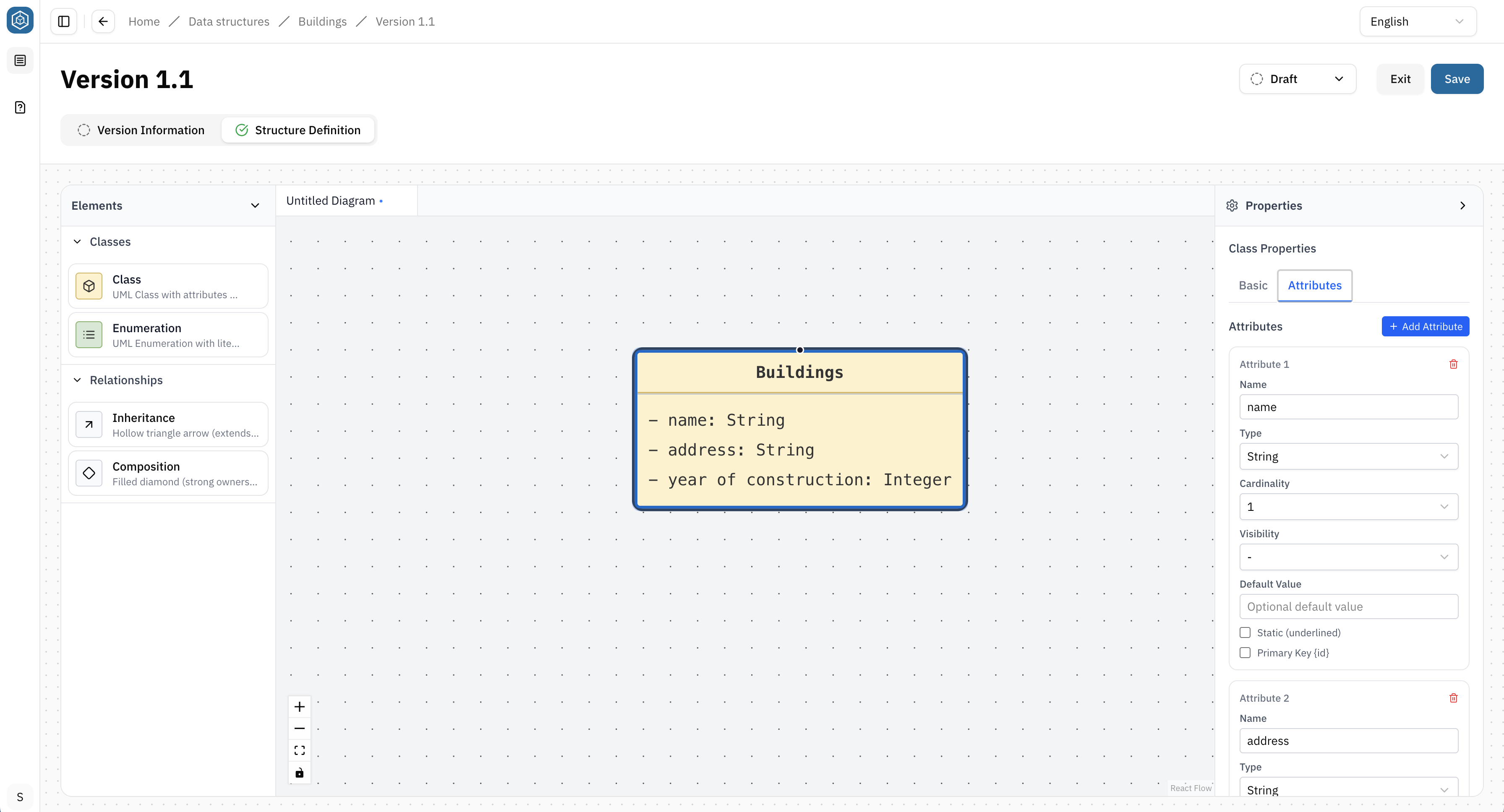
→ A Class can be edited, renamed, or deleted at any time while the Data structureData structureA versioned data-related element that defines the schema and organization of data. It specifies how data is structured and interpreted within the Platform. is in the Draft status.
Root Class
Every Data structureData structureA versioned data-related element that defines the schema and organization of data. It specifies how data is structured and interpreted within the Platform. requires one Root Class. The Root Class defines the starting point of the Data structureData structureA versioned data-related element that defines the schema and organization of data. It specifies how data is structured and interpreted within the Platform. and determines which Class represents the top level of the resulting schema.
This is required when a Data structureData structureA versioned data-related element that defines the schema and organization of data. It specifies how data is structured and interpreted within the Platform. contains multiple Classes. When the Data structureData structureA versioned data-related element that defines the schema and organization of data. It specifies how data is structured and interpreted within the Platform. is used in a Mapping in a Pipeline of a DatasetDatasetA data-related element that contains processed data and makes it available for consumption. A Dataset is populated via Pipelines and carries Metadata and access permissions., CIVITAS/CORE needs to know which Class defines the top-level object that enters or leaves the Mapping.
To define the Root Class:
- Select a Class on the canvas
- Enable Root class in the Class Properties
Only one Class can be the Root Class. Selecting another Class as the Root Class automatically removes the setting from the previous Root Class.
Delete a Class
Select the Class on the canvas and press the Delete key.
Use a Class to represent a distinct object. Use Attributes to describe that object.
Enums
An Enum (Enumeration) defines a fixed list of predefined values that an Attribute can use.
Use an Enum when only a limited set of values is allowed and these values are not expected to have additional Attributes or Relationships.
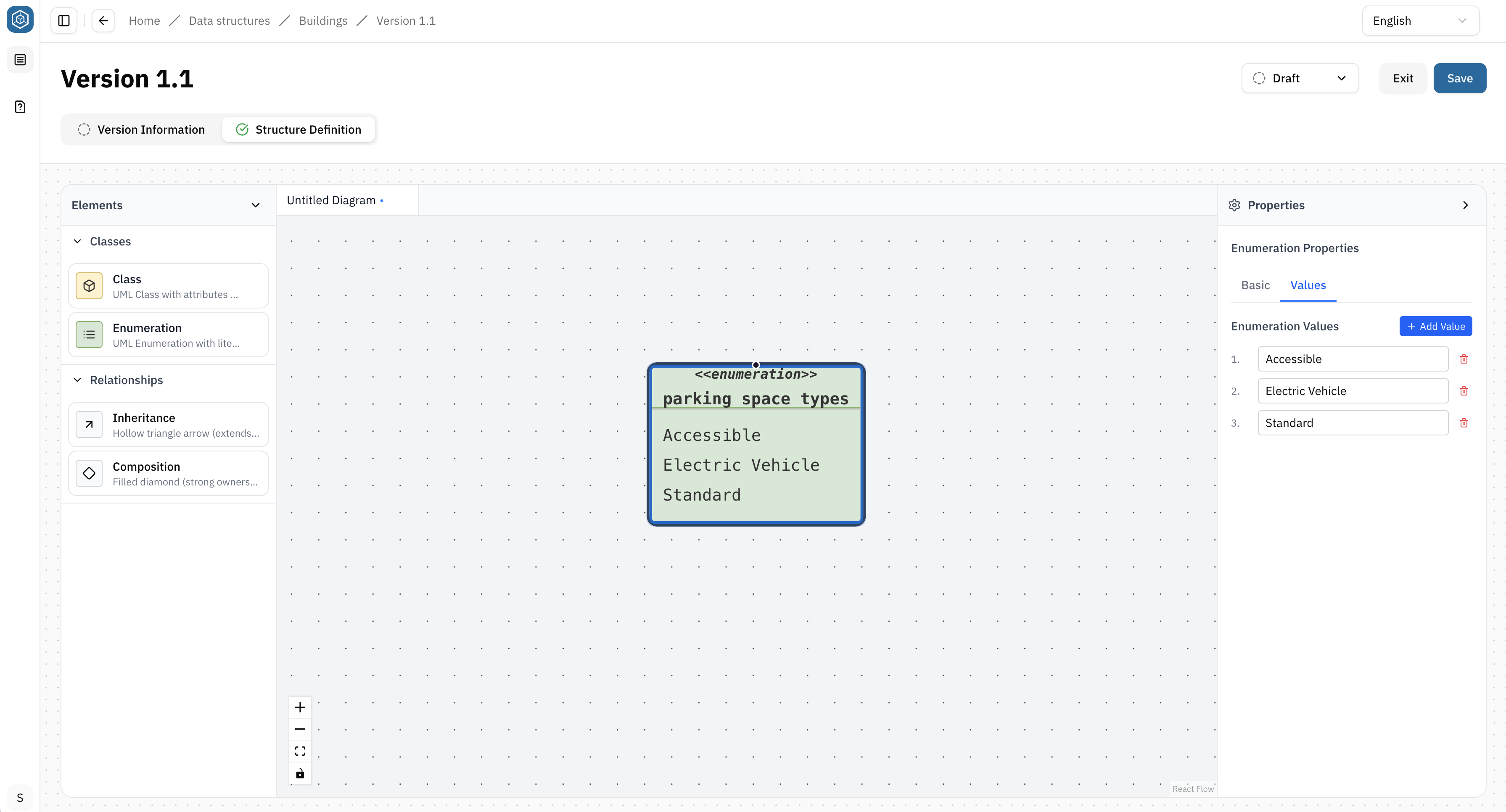
Example Instead of allowing any text value for a parking space type, create an Enum with the values: Accessible, Electric Vehicle, Standard
Create an Enum
- Drag an Enum from the left sidebar onto the canvas
- Enter a name
- Add the allowed values in the right properties panel
- Hit Save
Delete an Enum
Select the Enum on the canvas and press the Delete key.
Use an Enum for predefined value lists. If the values need their own Attributes or Relationships, create a Class instead.
Attributes
Attributes describe the properties of a Class. Each Attribute represents a single piece of information about the object defined by the Class.
Add an Attribute
- Select a Class on the canvas.
- Open the Attributes section in the right properties panel.
- Select Add Attribute
- Configure the Attribute
For each Attribute, you can define:
- Name: A unique name for the Attribute
- Type: Choose a primitive or geometry data type
- Cardinality: Specify whether the Attribute stores a single value or multiple values
- Default Value (optional): Set a value that is used by default
- Static (optional): Mark the Attribute as static
- Primary Key (optional): Identifies the Attribute as the unique identifier of the Class
Use meaningful names and choose the most appropriate data type for each Attribute. Keep Attributes focused on describing the selected Class.
Relationships
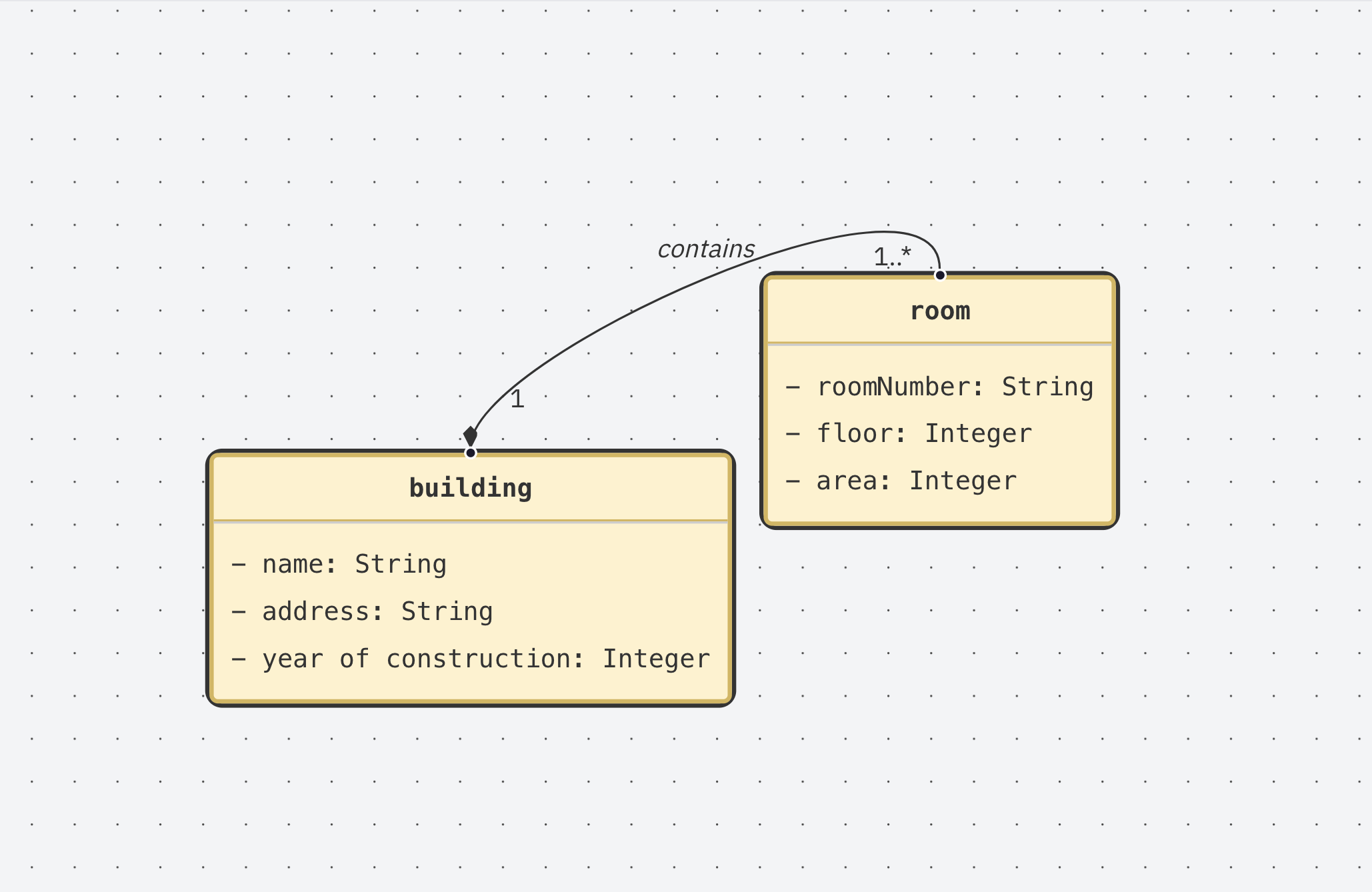
Relationships connect Classes and describe how different types of objects belong together. For example, a Building can contain multiple Rooms. The relationship connects both Classes and describes how they are related.
Create a Relationship
- Select a Relationship type from the left sidebar
- Drag a connection from the start Class to the end Class
- Select the connection to configure it in the right properties panel.
Alternative: Create a generic connection first and change the Relationship type later using the Relationship Type property.
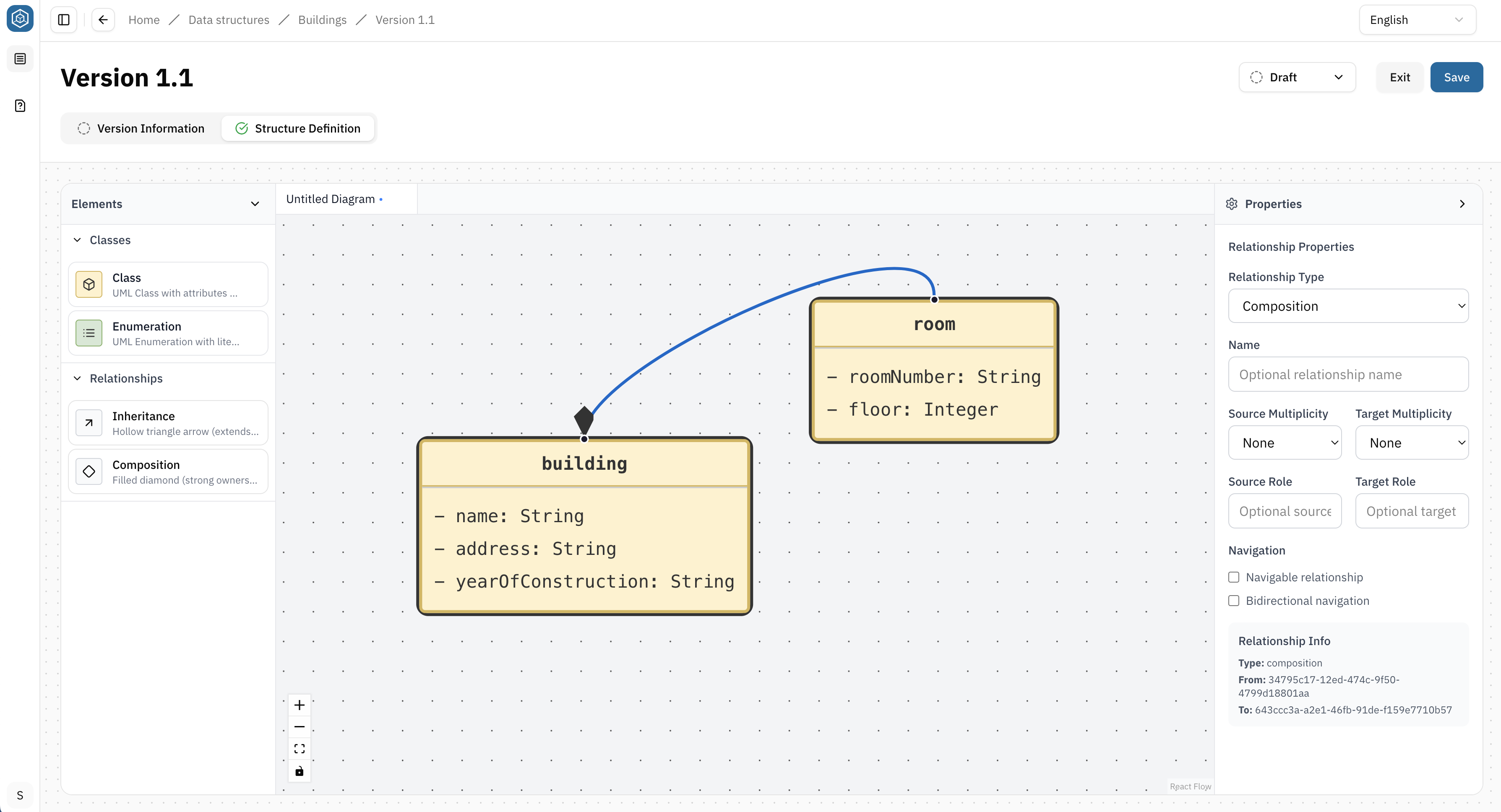
Every Class that belongs to a Data structureData structureA versioned data-related element that defines the schema and organization of data. It specifies how data is structured and interpreted within the Platform. must be connected through Relationships. Unconnected Classes are not included in the hierarchical structure used throughout the Platform, for example in the Mapping Editor.
Relationship Types
| Relationship Type | Description |
|---|---|
| Composition | Represents a whole–part relationship where the contained objects belong to exactly one parent and typically do not exist independently |
| Inheritance | Allows one Class to inherit the properties of another Class. Use this when multiple Classes share common Attributes and behavior |
For each Relationship, you can define:
- Relationship Type: Defines how the connected Classes relate to each other
- Name (optional): Assign a descriptive name to the Relationship
- Multiplicity (Cardinalities): Defines how many objects can participate in the Relationship
- Roles (optional): Assign names to the connected ends of the Relationship
- Navigation (optional): Defines whether the Relationship can be navigated in one or both directions
Delete a Relationship
Select the Relationship on the canvas and press the Delete key.
The direction of a Relationship is significant. Always connect the start Class and end Class according to the logical structure of your data. Relationship direction determines how the Data structureData structureA versioned data-related element that defines the schema and organization of data. It specifies how data is structured and interpreted within the Platform. is interpreted throughout the Platform, for example in the Mapping Editor.
Cardinalities/Multiplicity
Cardinalities define how many objects can participate in a Relationship. They describe the allowed number of connected objects between two Classes.
The following Cardinalities are commonly used:
| Cardinality | Meaning | Description |
|---|---|---|
| 1 | Exactly one | Exactly one object is required |
| 0..1 | Zero or one | The relationship is optional. At most one object can be related |
| 0..* | Zero or more | Any number of objects can be related, including none |
| 1..* | One or more | One or more objects must be related |
Example: A Building can contain many Rooms, while each Room belongs to exactly one Building.
Data structure versions and usage
A Data structureData structureA versioned data-related element that defines the schema and organization of data. It specifies how data is structured and interpreted within the Platform. Version can be used by data-related elements, such as Data sourcesData sourceA data-related element that represents the origin of data. It defines how data is connected, accessed, and ingested into the Platform, such as an external database or sensor network. and DatasetsDatasetA data-related element that contains processed data and makes it available for consumption. A Dataset is populated via Pipelines and carries Metadata and access permissions.. Data structureData structureA versioned data-related element that defines the schema and organization of data. It specifies how data is structured and interpreted within the Platform. Versions can already be used while they are in Draft. This allows the Structure Definition to be developed and adjusted iteratively while building the complete data flow.
Data sourcesData sourceA data-related element that represents the origin of data. It defines how data is connected, accessed, and ingested into the Platform, such as an external database or sensor network. use a Data structureData structureA versioned data-related element that defines the schema and organization of data. It specifies how data is structured and interpreted within the Platform. Version to describe the structure of the data they provide. Within DatasetsDatasetA data-related element that contains processed data and makes it available for consumption. A Dataset is populated via Pipelines and carries Metadata and access permissions., Data structureData structureA versioned data-related element that defines the schema and organization of data. It specifies how data is structured and interpreted within the Platform. Versions are used in Pipelines, for example by Data sourceData sourceA data-related element that represents the origin of data. It defines how data is connected, accessed, and ingested into the Platform, such as an external database or sensor network., Mapping and Data storageData storageA Pipeline node that persists data inside the Platform so that it can be provided through an API. The Platform offers the Sensor Data storage, which stores sensor data for the SensorThings API, and the Geospatial Data storage, which stores geospatial data in tables for WFS/WMS APIs. The Data storages used in the Pipelines of a Dataset determine which API types the Dataset can offer. nodes.
Editing a Data structure Version that is in use
The usage of a Data structureData structureA versioned data-related element that defines the schema and organization of data. It specifies how data is structured and interpreted within the Platform. Version can restrict changes to its Structure Definition. While a Version is in Draft, its Structure Definition can be edited.
An Available Version must be returned to Draft before its Structure Definition can be changed. If the Version is in use by an Available data-related element, returning it to Draft is blocked.
In this case, the dependencies must be resolved before the Version can be returned to Draft and its Structure Definition can be changed.
For an overview of status and editing restrictions, see → Status lifecycle and editing.
If an Available Data structureData structureA versioned data-related element that defines the schema and organization of data. It specifies how data is structured and interpreted within the Platform. Version needs substantial changes, consider creating a new Version instead of returning the existing Version to Draft. This allows existing usages to remain unchanged while the Data structureData structureA versioned data-related element that defines the schema and organization of data. It specifies how data is structured and interpreted within the Platform. is developed further.
Summary
You have learned how to:
- use the Data structureData structureA versioned data-related element that defines the schema and organization of data. It specifies how data is structured and interpreted within the Platform. canvas
- create Classes, Enums, and Attributes
- connect Classes using Relationships
- choose appropriate Cardinalities
- select the appropriate Relationship type